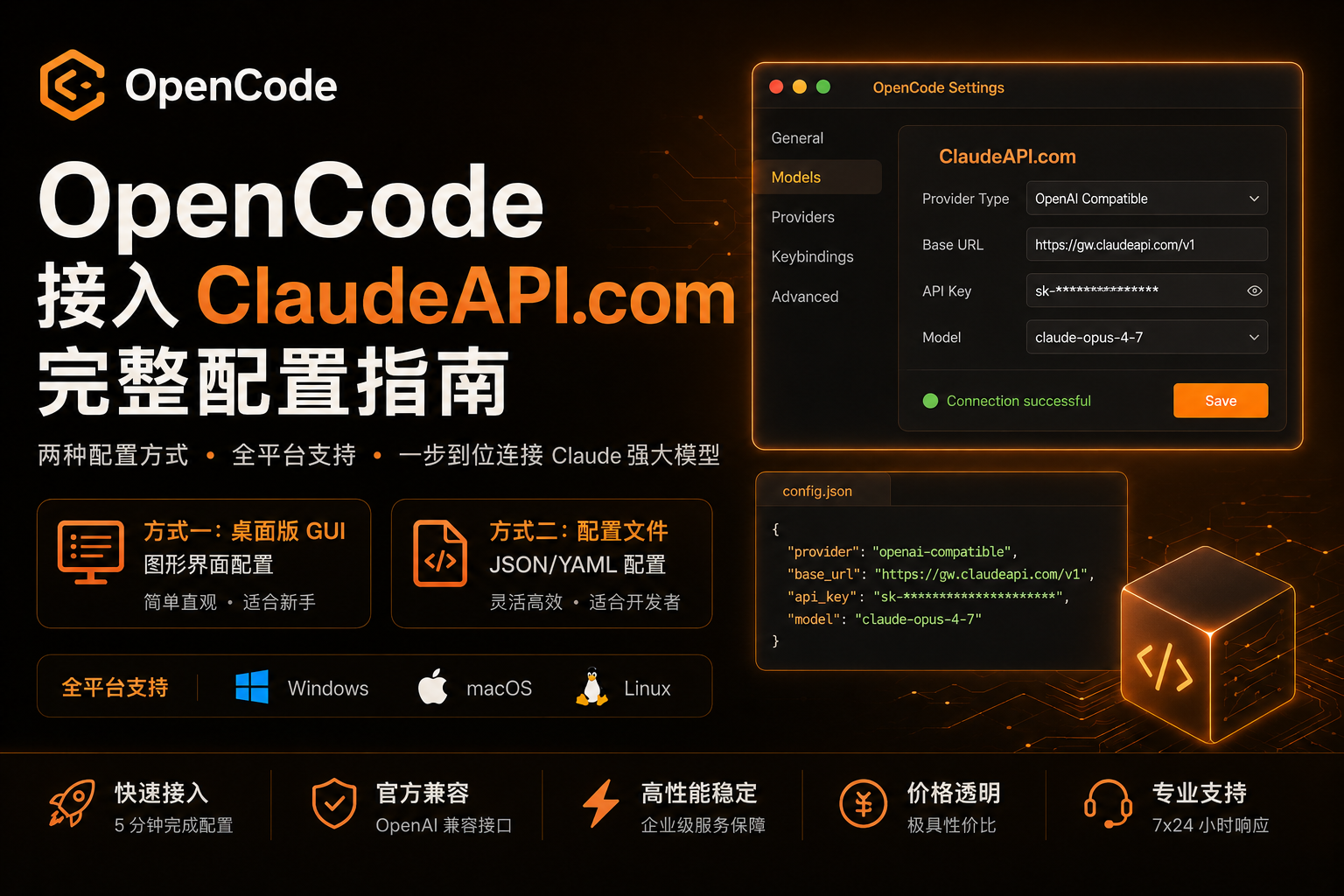
OpenCode 接入 ClaudeAPI.com 完整配置指南
OpenCode 支持两种配置方式:桌面版 GUI 图形界面(适合新手)和 配置文件(适合开发者与多项目管理)。本文将完整覆盖两种方案,以及 Windows、macOS、Linux 全平台操作步骤。
一、准备工作
在开始前,你需要:
- 在 claudeapi.com 注册账号并获取 API Key
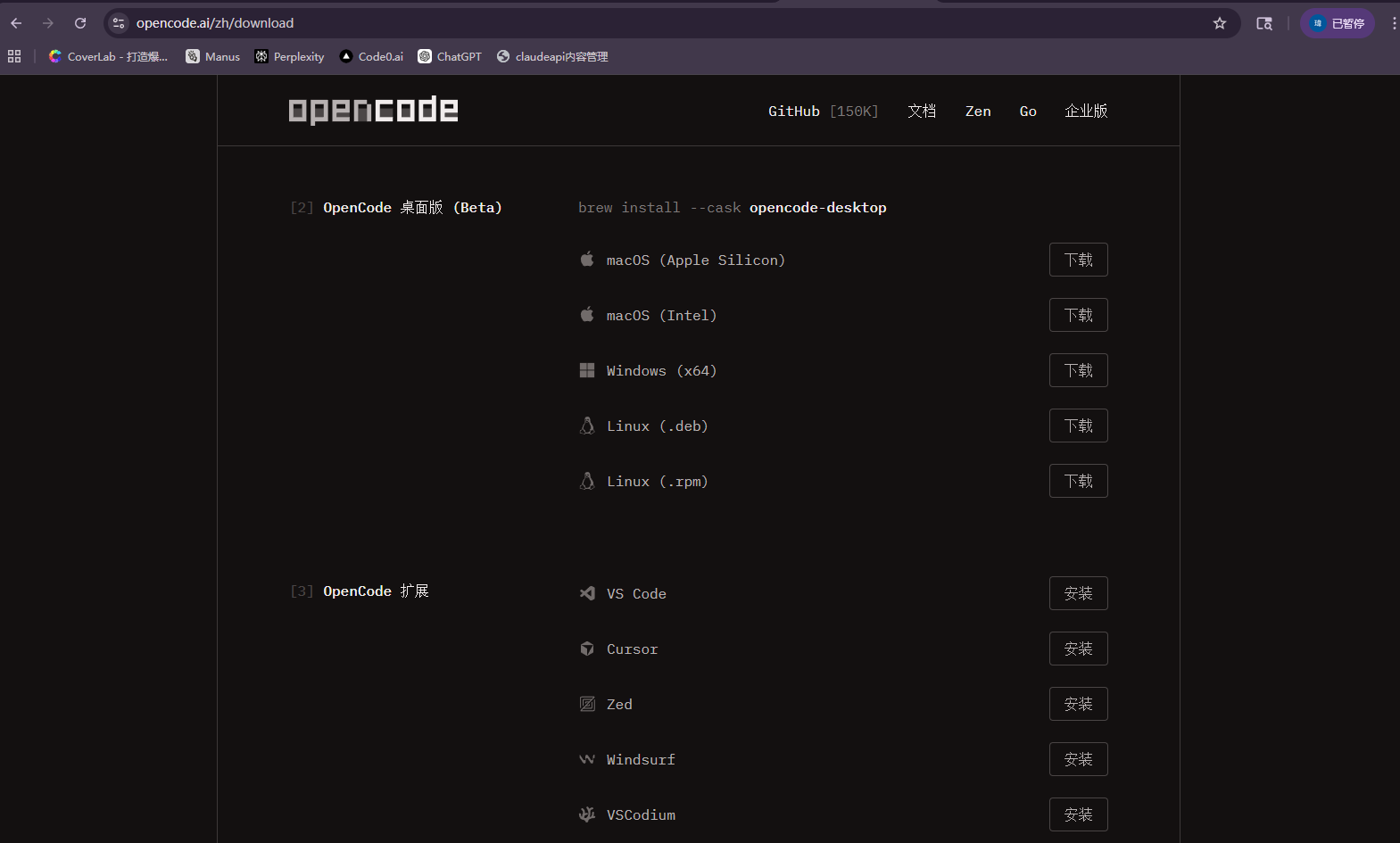
- 下载并安装 OpenCode
ClaudeAPI.com 接入信息:
| 字段 | 值 |
|---|---|
| 基础 URL | https://gw.claudeapi.com/v1 |
| API Key | 在控制台获取,格式为 sk-xxx |
二、方式一:桌面版 GUI 配置(推荐新手)
OpenCode 桌面版提供可视化配置界面,无需手动编辑 JSON 文件,3 步完成接入。
操作步骤
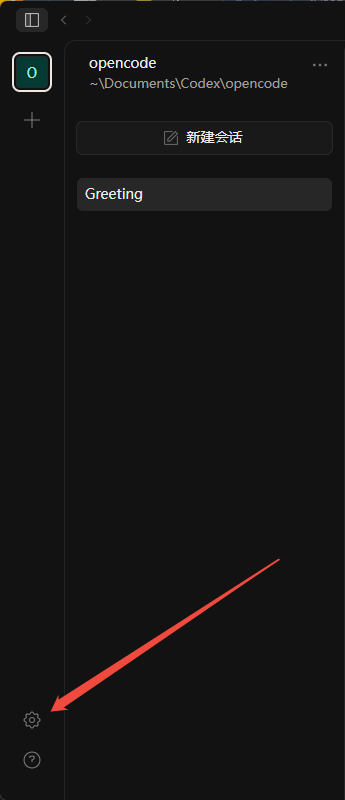
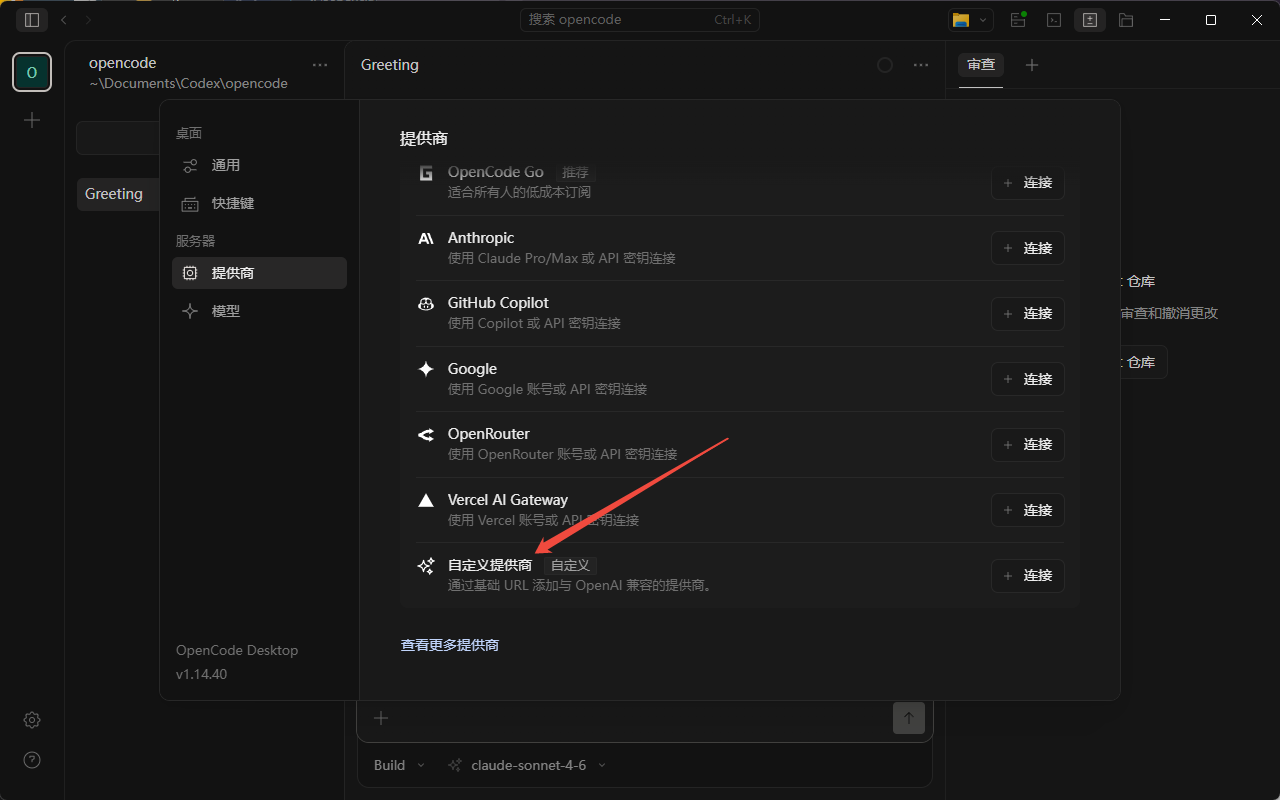
第一步:打开供应商设置
启动 OpenCode 后,点击左下角 设置图标(⚙),进入供应商管理页面,点击「添加供应商」或选择自定义供应商。
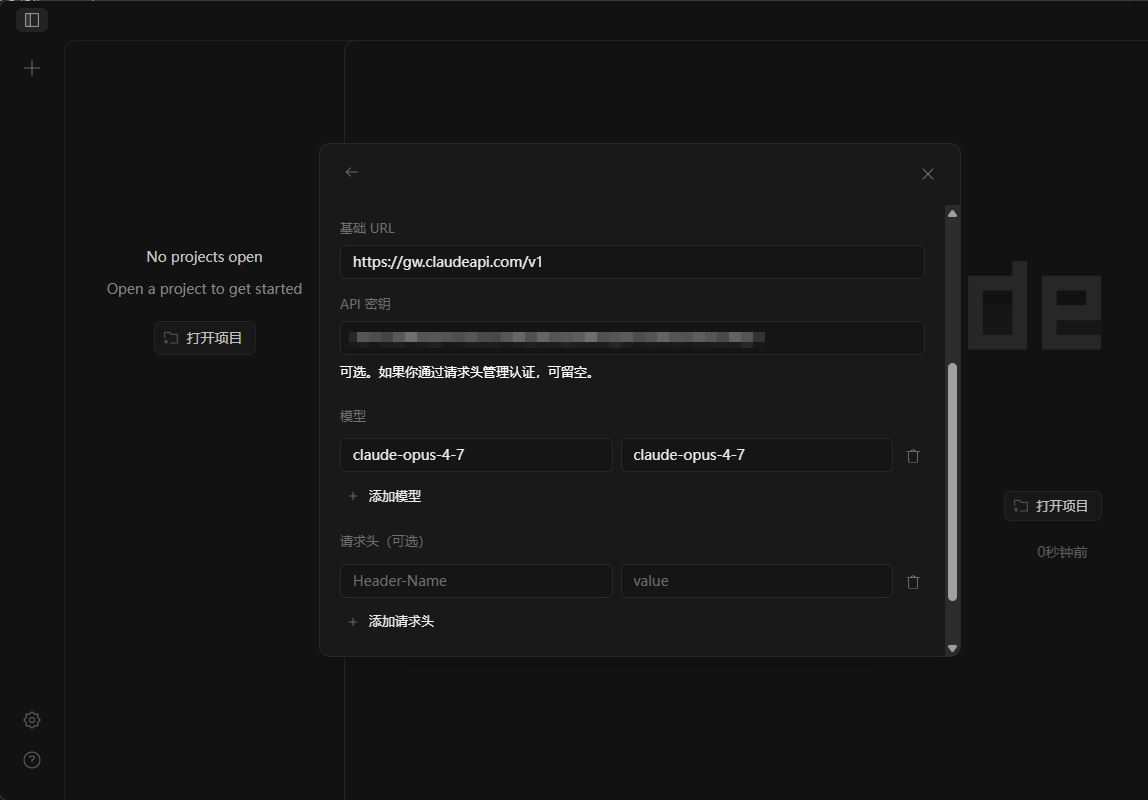
第二步:填写配置字段
在弹出的配置窗口中填写以下信息:
| 字段 | 填写内容 |
|---|---|
| 基础 URL | https://gw.claudeapi.com/v1 |
| API 密钥 | 你的 ClaudeAPI.com API Key |
| 模型(左列) | 模型 ID,如 claude-sonnet-4-6 |
| 模型(右列) | 模型显示名称,如 Claude Sonnet 4.6 |
| 请求头 | 一般留空,无需填写 |
第三步:添加所需模型
点击「+ 添加模型」可添加多个模型。推荐按需添加:
| 模型 ID | 显示名称 | 定价(输入/输出) | 适用场景 |
|---|---|---|---|
claude-opus-4-7 |
Claude Opus 4.7 | $4.0 / $20.0 per 1M | 复杂推理、深度代码分析 |
claude-opus-4-6 |
Claude Opus 4.6 | $4.0 / $20.0 per 1M | 复杂推理、长上下文 |
claude-sonnet-4-6 |
Claude Sonnet 4.6 | $2.4 / $12.0 per 1M | 通用开发、生产环境 ⭐ |
claude-haiku-4-5-20251001 |
Claude Haiku 4.5 | $0.8 / $4.0 per 1M | 快速响应、轻量任务 |
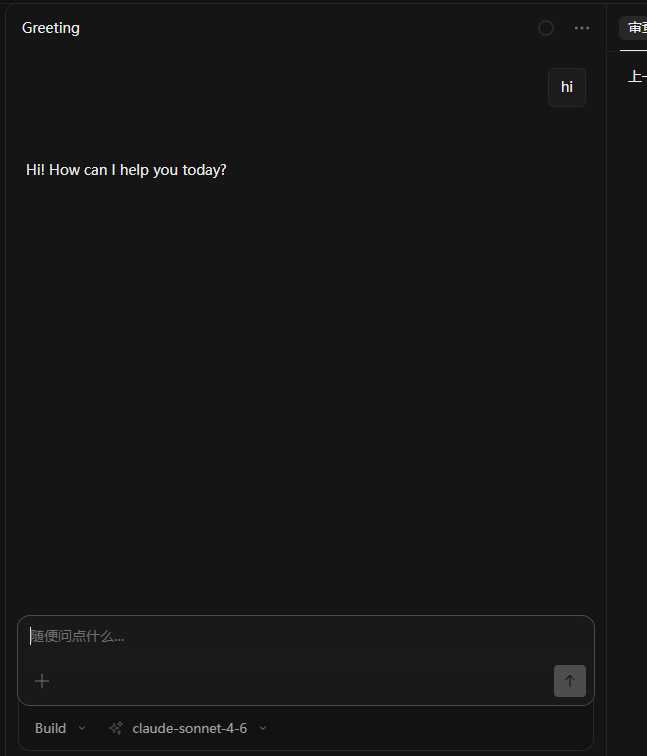
保存后,在主界面模型下拉菜单中选择对应模型即可开始使用。
三、方式二:配置文件(推荐开发者)
适合需要版本管理、多项目切换、或在服务器/CI 环境中使用 OpenCode 的场景。
配置文件路径
| 平台 | 全局配置路径 | 项目级配置路径 |
|---|---|---|
| Windows | %USERPROFILE%\.config\opencode\opencode.json |
项目根目录 opencode.json |
| macOS | ~/.config/opencode/opencode.json |
项目根目录 opencode.json |
| Linux | ~/.config/opencode/opencode.json |
项目根目录 opencode.json |
创建配置目录
# macOS / Linux
mkdir -p ~/.config/opencode

# Windows (PowerShell)
New-Item -ItemType Directory -Force -Path "$env:USERPROFILE\.config\opencode"
# macOS / Linux
mkdir -p ~/.config/opencode

# Windows (PowerShell)
New-Item -ItemType Directory -Force -Path "$env:USERPROFILE\.config\opencode"
完整配置模板(含所有模型)
{
  "$schema": "https://opencode.ai/config.json",
  "provider": {
    "claudeapi": {
      "npm": "@ai-sdk/openai-compatible",
      "name": "ClaudeAPI.com",
      "options": {
        "baseURL": "https://gw.claudeapi.com/v1",
        "apiKey": "{env:CLAUDEAPI_API_KEY}"
      },
      "models": {
        "claude-opus-4-7": {
          "name": "Claude Opus 4.7",
          "limit": {
            "context": 200000,
            "output": 32000
          }
        },
        "claude-opus-4-6": {
          "name": "Claude Opus 4.6",
          "limit": {
            "context": 200000,
            "output": 32000
          }
        },
        "claude-sonnet-4-6": {
          "name": "Claude Sonnet 4.6",
          "limit": {
            "context": 200000,
            "output": 16000
          }
        },
        "claude-haiku-4-5-20251001": {
          "name": "Claude Haiku 4.5",
          "limit": {
            "context": 200000,
            "output": 8000
          }
        }
      }
    }
  },
  "model": "claudeapi/claude-sonnet-4-6"
}
{
  "$schema": "https://opencode.ai/config.json",
  "provider": {
    "claudeapi": {
      "npm": "@ai-sdk/openai-compatible",
      "name": "ClaudeAPI.com",
      "options": {
        "baseURL": "https://gw.claudeapi.com/v1",
        "apiKey": "{env:CLAUDEAPI_API_KEY}"
      },
      "models": {
        "claude-opus-4-7": {
          "name": "Claude Opus 4.7",
          "limit": {
            "context": 200000,
            "output": 32000
          }
        },
        "claude-opus-4-6": {
          "name": "Claude Opus 4.6",
          "limit": {
            "context": 200000,
            "output": 32000
          }
        },
        "claude-sonnet-4-6": {
          "name": "Claude Sonnet 4.6",
          "limit": {
            "context": 200000,
            "output": 16000
          }
        },
        "claude-haiku-4-5-20251001": {
          "name": "Claude Haiku 4.5",
          "limit": {
            "context": 200000,
            "output": 8000
          }
        }
      }
    }
  },
  "model": "claudeapi/claude-sonnet-4-6"
}
设置环境变量(推荐,避免 Key 泄露)
Windows (PowerShell)
# 临时设置(当前会话)
$env:CLAUDEAPI_API_KEY="sk-xxx"

# 永久设置(用户级,重启后生效)
[Environment]::SetEnvironmentVariable("CLAUDEAPI_API_KEY", "sk-xxx", "User")
# 临时设置(当前会话)
$env:CLAUDEAPI_API_KEY="sk-xxx"

# 永久设置(用户级,重启后生效)
[Environment]::SetEnvironmentVariable("CLAUDEAPI_API_KEY", "sk-xxx", "User")
macOS / Linux
# 临时设置
export CLAUDEAPI_API_KEY="sk-xxx"

# 永久设置
echo 'export CLAUDEAPI_API_KEY="sk-xxx"' >> ~/.bashrc  # 或 ~/.zshrc
source ~/.bashrc
# 临时设置
export CLAUDEAPI_API_KEY="sk-xxx"

# 永久设置
echo 'export CLAUDEAPI_API_KEY="sk-xxx"' >> ~/.bashrc  # 或 ~/.zshrc
source ~/.bashrc
四、两种方式对比
| 桌面 GUI | 配置文件 | |
|---|---|---|
| 上手难度 | ⭐ 简单 | ⭐⭐ 需了解 JSON |
| 适合场景 | 个人日常使用 | 多项目、团队、CI/CD |
| Key 安全性 | 存储在应用内 | 可通过环境变量隔离 |
| 版本管理 | 不支持 | 支持 Git 追踪 |
| 多项目配置 | 手动切换 | 项目级 opencode.json 自动切换 |
五、验证配置
# 查看配置加载情况
opencode debug config

# 列出所有可用模型
opencode models

# 使用指定模型启动
opencode --model claudeapi/claude-sonnet-4-6
# 查看配置加载情况
opencode debug config

# 列出所有可用模型
opencode models

# 使用指定模型启动
opencode --model claudeapi/claude-sonnet-4-6
启动后在 TUI 中执行 /models,确认 ClaudeAPI.com 的模型出现在列表中。
六、常见问题
| 问题 | 解决方案 |
|---|---|
| API 认证失败 | 确认 Key 正确;基础 URL 必须为 https://gw.claudeapi.com/v1,结尾带 /v1 |
| 模型列表为空 | 检查 models 字段是否正确填写模型 ID |
| 响应被截断 | 在 options 中加 "timeout": 600000(毫秒) |
| Windows 找不到配置 | 路径使用 %USERPROFILE% 而非 ~,两者在 Windows 不等价 |
| GUI 配置后无效 | 重启 OpenCode 使配置生效 |
提示:
claude-sonnet-4-6是 ClaudeAPI.com 的默认推荐模型,综合性能与成本最均衡,适合大多数编码任务。如需处理超长代码库或复杂架构分析,切换至claude-opus-4-7获得最佳效果。