Build Your Own MCP Server: Give Claude Direct Access to Local CSV Data
15 min read
Introduction: Why Should You Care About MCP?
MCP (Model Context Protocol) is Anthropic’s open protocol that lets Claude access local files, databases, and custom tools. In this guide, you’ll build an MCP Server that allows Claude to query CSV data directly — in under 100 lines of Python, capable of answering complex data analysis questions in under 5 seconds.
What this guide covers:
- What MCP is and why it matters (quick primer) 2.3 real-world enterprise use cases where MCP solves actual problems 3.Hands-on: building an MCP Server in 100 lines of Python 4.Integrating with Claude’s tool system and deploying to production
1. What Is MCP — and Why Does It Matter?
MCP (Model Context Protocol) is a standardized protocol that allows AI models to interact securely with external systems.
Think of it this way: if Claude is an assistant, MCP is what lets it:
- 📞 Make phone calls (TCP/HTTP communication)
- 🗂️ Browse the office filing cabinet (local databases)
- 🛠️ Use workplace tools (APIs and functions)
- 🔐 Operate strictly within your defined rules (permission control)
MCP Architecture
┌─────────────┐
│   Claude    │  <-- AI Assistant
└──────┬──────┘
       │ Question: "What products do we have?"
       │
       ▼
┌─────────────────────────┐
│   MCP Protocol              │
│(Standard communication layer)         │
└──────┬──────────────────┘
       │ Invokes tool: list_products()
       │
       ▼
┌─────────────────────────┐
│   MCP Server            │ <-- Your server
│  (Exposes tool list)    │
└──────┬──────────────────┘
       │ Returns: full product list
       │
       ▼
┌─────────────────────────┐
│  Local Data Source      │
│  (CSV / DB / API)       │
└─────────────────────────┘
┌─────────────┐
│   Claude    │  <-- AI Assistant
└──────┬──────┘
       │ Question: "What products do we have?"
       │
       ▼
┌─────────────────────────┐
│   MCP Protocol              │
│(Standard communication layer)         │
└──────┬──────────────────┘
       │ Invokes tool: list_products()
       │
       ▼
┌─────────────────────────┐
│   MCP Server            │ <-- Your server
│  (Exposes tool list)    │
└──────┬──────────────────┘
       │ Returns: full product list
       │
       ▼
┌─────────────────────────┐
│  Local Data Source      │
│  (CSV / DB / API)       │
└─────────────────────────┘
MCP vs Tool Use: What’s the Difference?
| Feature | Tool Use(Old Way) | MCP(New Way) |
|---|---|---|
| Integration | Hard-coded tool definitions in the prompt | Dynamic tool registration, standardized |
| Complexity | Works for simple API calls | Built for local DBs and file systems |
| Maintainability | Changing a tool means rewriting the prompt | 更Update tools without touching the prompt |
| Production-ready | Good for demos | Built for production environments |
| Security | Manual validation required | Built-in permission management |
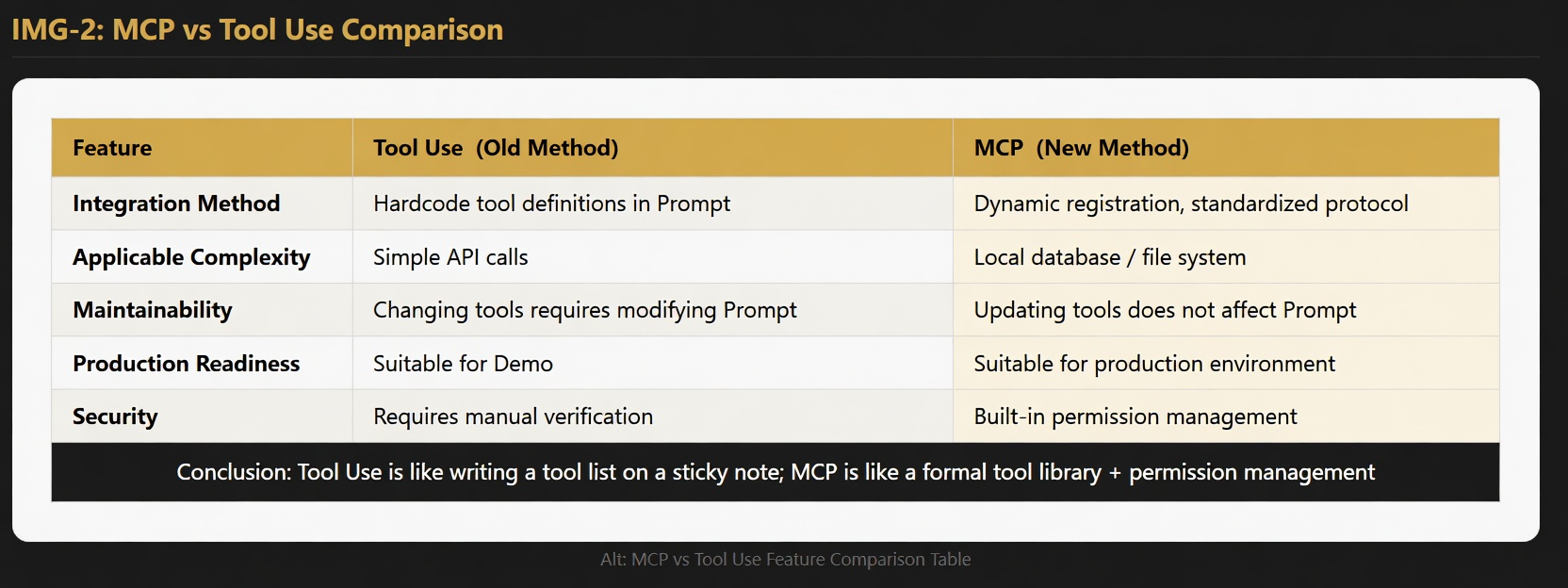
Conclusion: Tool Use is like scribbling a tool list on a sticky note. MCP is a proper tool registry with permission management built in.
MCP’s 5 Core Tool Types
| Tool Type | Example Use Case | Purpose |
|---|---|---|
| Sampling | Let Claude think through a problem | Deep reasoning and analysis |
| Tools | List available operations | Query and modify data |
| Resources | Expose text/binary content | File access, content retrieval |
| Prompts | Provide prompt templates | Customize AI behavior |
| Root Listing | Declare system capabilities | Tell Claude what it can do |
In this guide, we’ll be implementing the Tools type.
2. Three Real-World Use Cases: Where MCP Actually Shines
Use Case 1: Intelligent Data Analysis
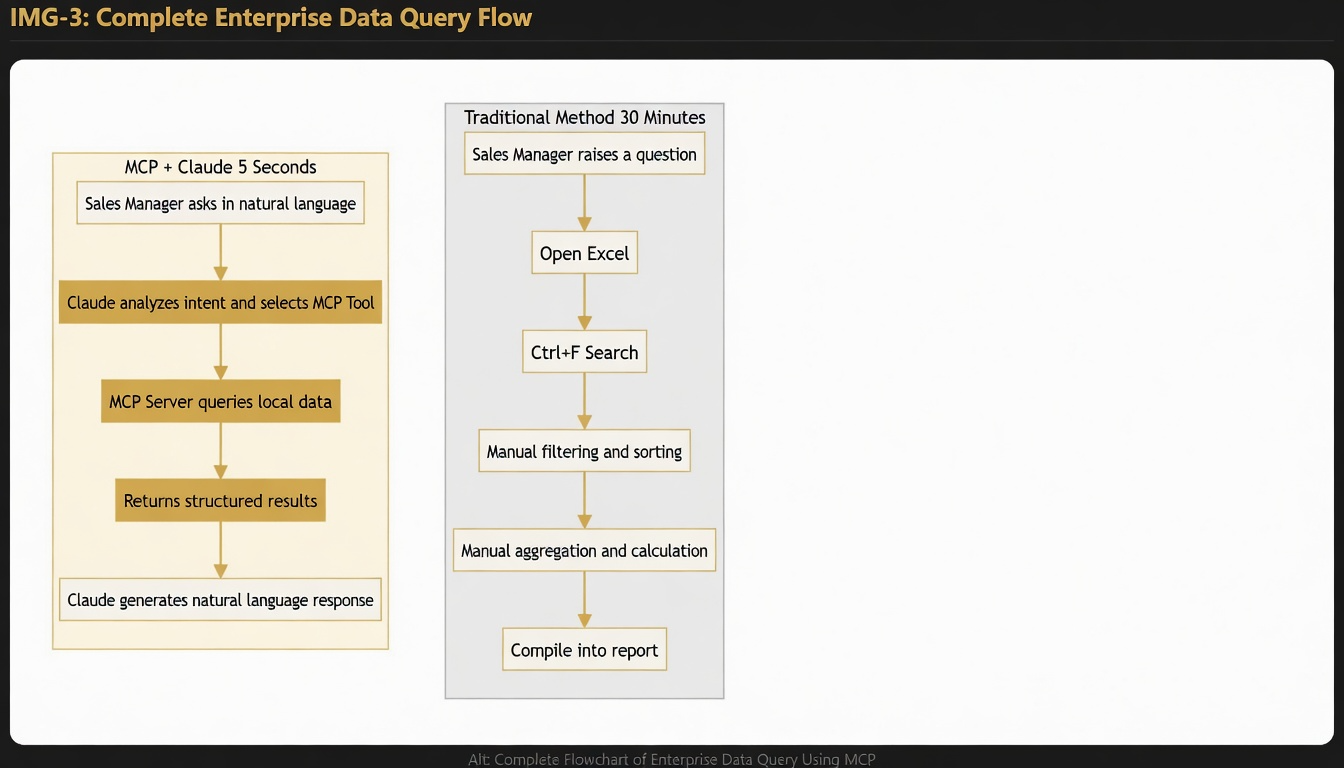
The old way:
Sales Manager → Opens Excel → Ctrl+F to search → Manual aggregation → 30 minutes later
Sales Manager → Opens Excel → Ctrl+F to search → Manual aggregation → 30 minutes later
With MCP + Claude:
Sales Manager: "What were our best-selling products last week?"
Claude queries the database directly → Answer in under a second
Sales Manager: "What were our best-selling products last week?"
Claude queries the database directly → Answer in under a second
Use Case 2: Internal Knowledge Base Q&A
An employee asks, “How do I apply for annual leave?” The old way means digging through 10 Wiki pages and still not being sure. With MCP + Claude, the answer comes back instantly — pulling the exact policy paragraph, no searching required.
Use Case 3: Cross-System Data Aggregation
A manager asks, “Which sales team was most profitable this year?” Claude’s MCP simultaneously queries the CRM (revenue), finance system (costs), and inventory system (turnover rate) — then synthesizes a complete answer on the spot.
3. Hands-On: Build an MCP Server in ~100 Lines of Python
Before You Start: 5-Minute Setup Checklist
# Check Python version (3.11+ required)
python --version
# Install dependencies
pip install mcp anthropic pydantic python-dotenv
# Check Python version (3.11+ required)
python --version
# Install dependencies
pip install mcp anthropic pydantic python-dotenv
Step 1: Prepare Your Data (products.csv)
product_id,product_name,category,price,stock,created_date
P001,Claude Opus 4.6,AI Model,2.99,5000,2026-03-15
P002,Claude Sonnet 4.6,AI Model,1.99,8000,2026-03-15
P003,Claude Haiku 4.5,AI Model,0.80,10000,2026-02-20
P004,API Gateway Pro,Infrastructure,29.99,100,2026-04-01
P005,ClaudeAPI Console,Tools,0.00,999999,2026-01-01
P006,MCP Integration Kit,Tools,99.99,50,2026-04-10
P007,Premium Support,Service,199.99,200,2026-03-01
P008,Batch API Access,Feature,49.99,300,2026-04-01
product_id,product_name,category,price,stock,created_date
P001,Claude Opus 4.6,AI Model,2.99,5000,2026-03-15
P002,Claude Sonnet 4.6,AI Model,1.99,8000,2026-03-15
P003,Claude Haiku 4.5,AI Model,0.80,10000,2026-02-20
P004,API Gateway Pro,Infrastructure,29.99,100,2026-04-01
P005,ClaudeAPI Console,Tools,0.00,999999,2026-01-01
P006,MCP Integration Kit,Tools,99.99,50,2026-04-10
P007,Premium Support,Service,199.99,200,2026-03-01
P008,Batch API Access,Feature,49.99,300,2026-04-01
Step 2: Define Your Tools (Tool Definitions)
In your MCP Server, you need to tell Claude exactly which tools are available:
# Tool 1: List all products
{
    "name": "list_products",
    "description": "List all products in the database",
    "inputSchema": {"type": "object", "properties": {}, "required": []}
}
# Tool 2: Query by ID
{
    "name": "query_product",
    "description": "Get details of a specific product by ID",
    "inputSchema": {
        "type": "object",
        "properties": {
            "product_id": {"type": "string", "description": "Product ID (e.g., P001)"}
        },
        "required": ["product_id"]
    }
}
# Tool 3: Search by price range
{
    "name": "search_price_range",
    "inputSchema": {
        "type": "object",
        "properties": {
            "min_price": {"type": "number"},
            "max_price": {"type": "number"}
        },
        "required": ["min_price", "max_price"]
    }
}

# Tool 4: Filter by category  /  Tool 5: Get statistics (same pattern)
# Tool 1: List all products
{
    "name": "list_products",
    "description": "List all products in the database",
    "inputSchema": {"type": "object", "properties": {}, "required": []}
}
# Tool 2: Query by ID
{
    "name": "query_product",
    "description": "Get details of a specific product by ID",
    "inputSchema": {
        "type": "object",
        "properties": {
            "product_id": {"type": "string", "description": "Product ID (e.g., P001)"}
        },
        "required": ["product_id"]
    }
}
# Tool 3: Search by price range
{
    "name": "search_price_range",
    "inputSchema": {
        "type": "object",
        "properties": {
            "min_price": {"type": "number"},
            "max_price": {"type": "number"}
        },
        "required": ["min_price", "max_price"]
    }
}

# Tool 4: Filter by category  /  Tool 5: Get statistics (same pattern)
Key concept: inputSchema defines what parameters each tool accepts. Claude automatically picks the right tool based on what the user asks — no routing logic needed on your end.
Step 3: Implement the Tool Handler Functions
import csv, json
from pathlib import Path

products_data = []

def load_csv():
    global products_data
    with open("products.csv", "r", encoding="utf-8") as f:
        reader = csv.DictReader(f)
        products_data = [row for row in reader]

def list_all_products():
    result = "All Products:\n"
    for idx, p in enumerate(products_data, 1):
        result += f"{idx}. {p['product_name']} (ID: {p['product_id']})\n"
    return result

def query_product_by_id(product_id):
    for p in products_data:
        if p['product_id'].lower() == product_id.lower():
            return json.dumps(p, indent=2)
    return f"Product {product_id} not found"

def search_by_price_range(min_price, max_price):
    results = [p for p in products_data
               if min_price <= float(p['price']) <= max_price]
    return f"Found {len(results)} products:\n" + \
           "\n".join(f"  • {p['product_name']} - CNY{p['price']}" for p in results)

def filter_by_category(category):
    results = [p for p in products_data
               if p['category'].lower() == category.lower()]
    return f"Found {len(results)} products in {category}"

def get_stats():
    total = len(products_data)
    categories = set(p['category'] for p in products_data)
    avg_price = sum(float(p['price']) for p in products_data) / total
    return f"Total: {total} | Categories: {len(categories)} | Avg Price: CNY{avg_price:.2f}"
import csv, json
from pathlib import Path

products_data = []

def load_csv():
    global products_data
    with open("products.csv", "r", encoding="utf-8") as f:
        reader = csv.DictReader(f)
        products_data = [row for row in reader]

def list_all_products():
    result = "All Products:\n"
    for idx, p in enumerate(products_data, 1):
        result += f"{idx}. {p['product_name']} (ID: {p['product_id']})\n"
    return result

def query_product_by_id(product_id):
    for p in products_data:
        if p['product_id'].lower() == product_id.lower():
            return json.dumps(p, indent=2)
    return f"Product {product_id} not found"

def search_by_price_range(min_price, max_price):
    results = [p for p in products_data
               if min_price <= float(p['price']) <= max_price]
    return f"Found {len(results)} products:\n" + \
           "\n".join(f"  • {p['product_name']} - CNY{p['price']}" for p in results)

def filter_by_category(category):
    results = [p for p in products_data
               if p['category'].lower() == category.lower()]
    return f"Found {len(results)} products in {category}"

def get_stats():
    total = len(products_data)
    categories = set(p['category'] for p in products_data)
    avg_price = sum(float(p['price']) for p in products_data) / total
    return f"Total: {total} | Categories: {len(categories)} | Avg Price: CNY{avg_price:.2f}"
Step 4: Create the MCP Server
from mcp.server import Server
from mcp.types import Tool
import mcp.types as types

server = Server("mcp-csv-server")

@server.list_tools()
async def handle_list_tools() -> list[Tool]:
    return [
        Tool(name="list_products", description="List all products",
             inputSchema={"type": "object", "properties": {}, "required": []}),
       # ... 4 more tools defined the same way
    ]

@server.call_tool()
async def handle_call_tool(name: str, arguments: dict) -> list[types.TextContent]:
    if name == "list_products":
        result = list_all_products()
    elif name == "query_product":
        result = query_product_by_id(arguments["product_id"])
    elif name == "search_price_range":
        result = search_by_price_range(arguments["min_price"], arguments["max_price"])
    elif name == "filter_category":
        result = filter_by_category(arguments["category"])
    elif name == "get_stats":
        result = get_stats()
    else:
        result = f"Unknown tool: {name}"
    return [types.TextContent(type="text", text=result)]

def main():
    load_csv()
    server.run_stdio()

if __name__ == "__main__":
    main()
from mcp.server import Server
from mcp.types import Tool
import mcp.types as types

server = Server("mcp-csv-server")

@server.list_tools()
async def handle_list_tools() -> list[Tool]:
    return [
        Tool(name="list_products", description="List all products",
             inputSchema={"type": "object", "properties": {}, "required": []}),
       # ... 4 more tools defined the same way
    ]

@server.call_tool()
async def handle_call_tool(name: str, arguments: dict) -> list[types.TextContent]:
    if name == "list_products":
        result = list_all_products()
    elif name == "query_product":
        result = query_product_by_id(arguments["product_id"])
    elif name == "search_price_range":
        result = search_by_price_range(arguments["min_price"], arguments["max_price"])
    elif name == "filter_category":
        result = filter_by_category(arguments["category"])
    elif name == "get_stats":
        result = get_stats()
    else:
        result = f"Unknown tool: {name}"
    return [types.TextContent(type="text", text=result)]

def main():
    load_csv()
    server.run_stdio()

if __name__ == "__main__":
    main()
Step 5: Test It Out
Once running, here’s what Claude can actually do with natural language queries:
User: 「Show me all products under $50」
Claude  →  calls search_price_range(min_price=0, max_price=50)
MCP Server  →  returns 6 results:
  • Claude Opus 4.6   — $2.99
  • Claude Sonnet 4.6 — $1.99
  • Claude Haiku 4.5  — $0.80
  • API Gateway Pro   — $29.99
  • ClaudeAPI Console — $0.00
  • Batch API Access  — $49.99
Claude  →  calls search_price_range(min_price=0, max_price=50)
MCP Server  →  returns 6 results:
  • Claude Opus 4.6   — $2.99
  • Claude Sonnet 4.6 — $1.99
  • Claude Haiku 4.5  — $0.80
  • API Gateway Pro   — $29.99
  • ClaudeAPI Console — $0.00
  • Batch API Access  — $49.99
User: 「“Give me the details for Claude Sonnet 4.6”」
{
  "product_id": "P002",
  "product_name": "Claude Sonnet 4.6",
  "category": "AI Model",
  "price": "1.99",
  "stock": "8000",
  "created_date": "2026-03-15"
}
{
  "product_id": "P002",
  "product_name": "Claude Sonnet 4.6",
  "category": "AI Model",
  "price": "1.99",
  "stock": "8000",
  "created_date": "2026-03-15"
}
4. Integrating with Claude Clients
Integration with Claude Code
New to Claude API? Check out our Claude API Python 入门教程 to get up and running first.
# Start the MCP Server
import subprocess
server = subprocess.Popen(["python", "server.py"])
# Claude auto-discovers available tools and calls them based on user input
user_input = "Show me all Claude models under 2 dollars"
# Claude  →  calls search_price_range(0, 2)  →  returns results
# Start the MCP Server
import subprocess
server = subprocess.Popen(["python", "server.py"])
# Claude auto-discovers available tools and calls them based on user input
user_input = "Show me all Claude models under 2 dollars"
# Claude  →  calls search_price_range(0, 2)  →  returns results
Integration with Cline
- Start the MCP Server:
python server.py - Point Cline to your server address in its config
- Start prompting — Cline will automatically invoke the right tools
Environment Configuration
# .env
CSV_FILE=./products.csv
MCP_PORT=8000
DEBUG=false
# .env
CSV_FILE=./products.csv
MCP_PORT=8000
DEBUG=false
from dotenv import load_dotenv
import os

load_dotenv()
csv_file = os.getenv("CSV_FILE", "products.csv")
from dotenv import load_dotenv
import os

load_dotenv()
csv_file = os.getenv("CSV_FILE", "products.csv")
5. FAQ
Q: How do I handle large datasets (1M+ row CSVs)?
A: Switch to a database — avoid loading everything into memory at once:
import sqlite3
conn = sqlite3.connect("products.db")
cursor = conn.cursor()
def search_by_price_range(min_price, max_price):
    cursor.execute(
        "SELECT * FROM products WHERE price BETWEEN ? AND ?",
        (min_price, max_price)
    )
    return cursor.fetchall()
import sqlite3
conn = sqlite3.connect("products.db")
cursor = conn.cursor()
def search_by_price_range(min_price, max_price):
    cursor.execute(
        "SELECT * FROM products WHERE price BETWEEN ? AND ?",
        (min_price, max_price)
    )
    return cursor.fetchall()
Q: How do I keep data safe and prevent Claude from modifying records?
A: Expose only read-only tools, and require explicit permission checks for any write operations:
@server.call_tool()
async def handle_call_tool(name, args):
    if name.startswith("write_") or name.startswith("delete_"):
        if not verify_user_permission(user_id):
            return "Permission denied"
    return execute_tool(name, args)
@server.call_tool()
async def handle_call_tool(name, args):
    if name.startswith("write_") or name.startswith("delete_"):
        if not verify_user_permission(user_id):
            return "Permission denied"
    return execute_tool(name, args)
Q: Responses are too slow — how do I speed things up?
A: Add LRU caching and paginate your queries:
from functools import lru_cache

@lru_cache(maxsize=100)
def get_products_by_category(category):
    return filter_category(category)

def list_products(page=1, page_size=20):
    start = (page - 1) * page_size
    return products_data[start:start+page_size]
from functools import lru_cache

@lru_cache(maxsize=100)
def get_products_by_category(category):
    return filter_category(category)

def list_products(page=1, page_size=20):
    start = (page - 1) * page_size
    return products_data[start:start+page_size]
6. Wrap-Up & What’s Next
Here’s what you’ve covered in this guide:
- ✅ How MCP architecture differs from direct Tool Use
- ✅ How to define tools and implement their handler functions
- ✅ How to build a full MCP Server and integrate it with Claude
- ✅ How to handle common performance and security pitfalls
Where to Go from Here Ready to take it further? Here are some natural next steps:
- 🗄️ Swap in SQLite or PostgreSQL for more complex query support
- 🔐 Add role-based access control and audit logging
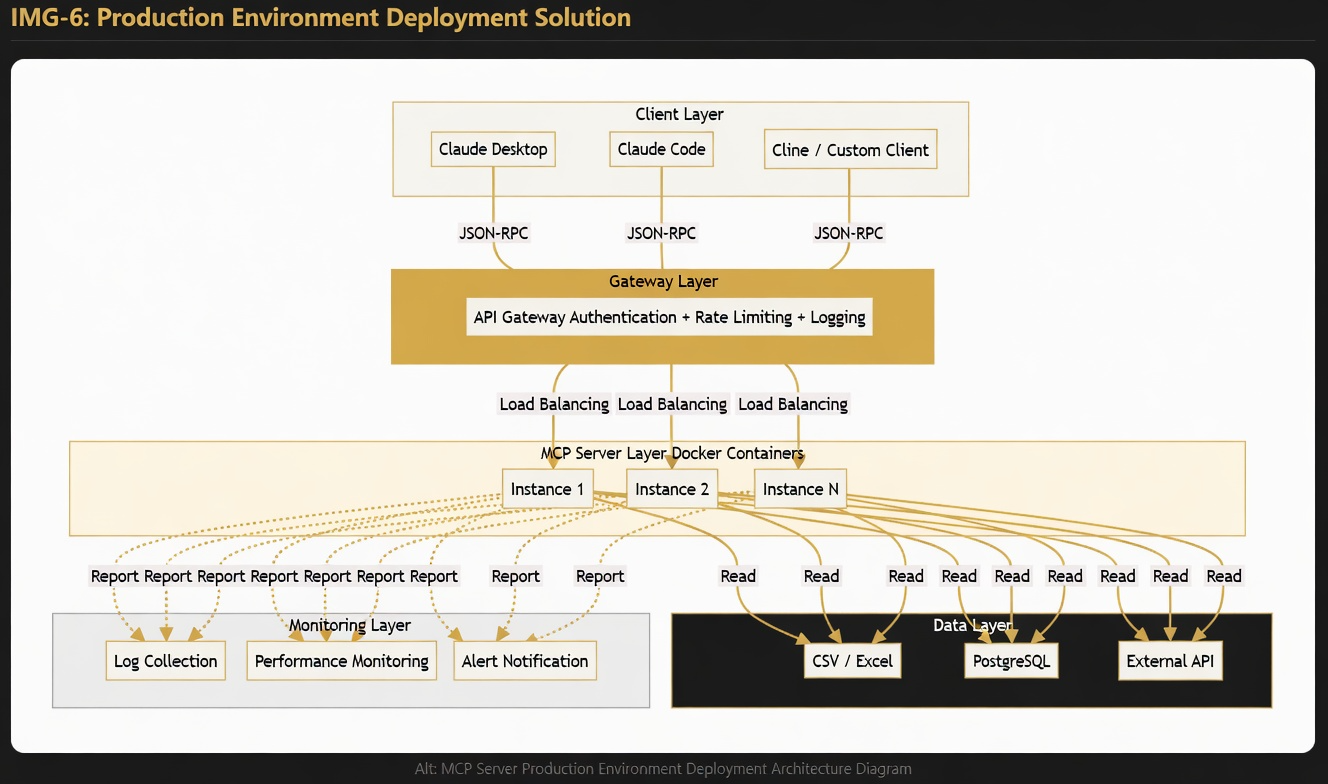
- 🔗 Connect multiple data sources simultaneously — CSV, database, and external APIs
- 🐳 Containerize with Docker for production deployment
Further Reading
- Claude API Pricing in 2026: Complete Cost Breakdown, Token Calculator & Money-Saving Tips
- Claude API with Python: The Complete Beginner’s Guide — From Setup to Streaming Output
Written by the ClaudeAPI team.