If you’re building AI-powered applications, getting models to reliably output structured JSON is a classic headache:
- Prompt engineering? The model occasionally wraps output in markdown or adds conversational fluff
- Regex extraction? Breaks the moment the format shifts slightly
- Custom parsing logic? Time-consuming to build, painful to maintain
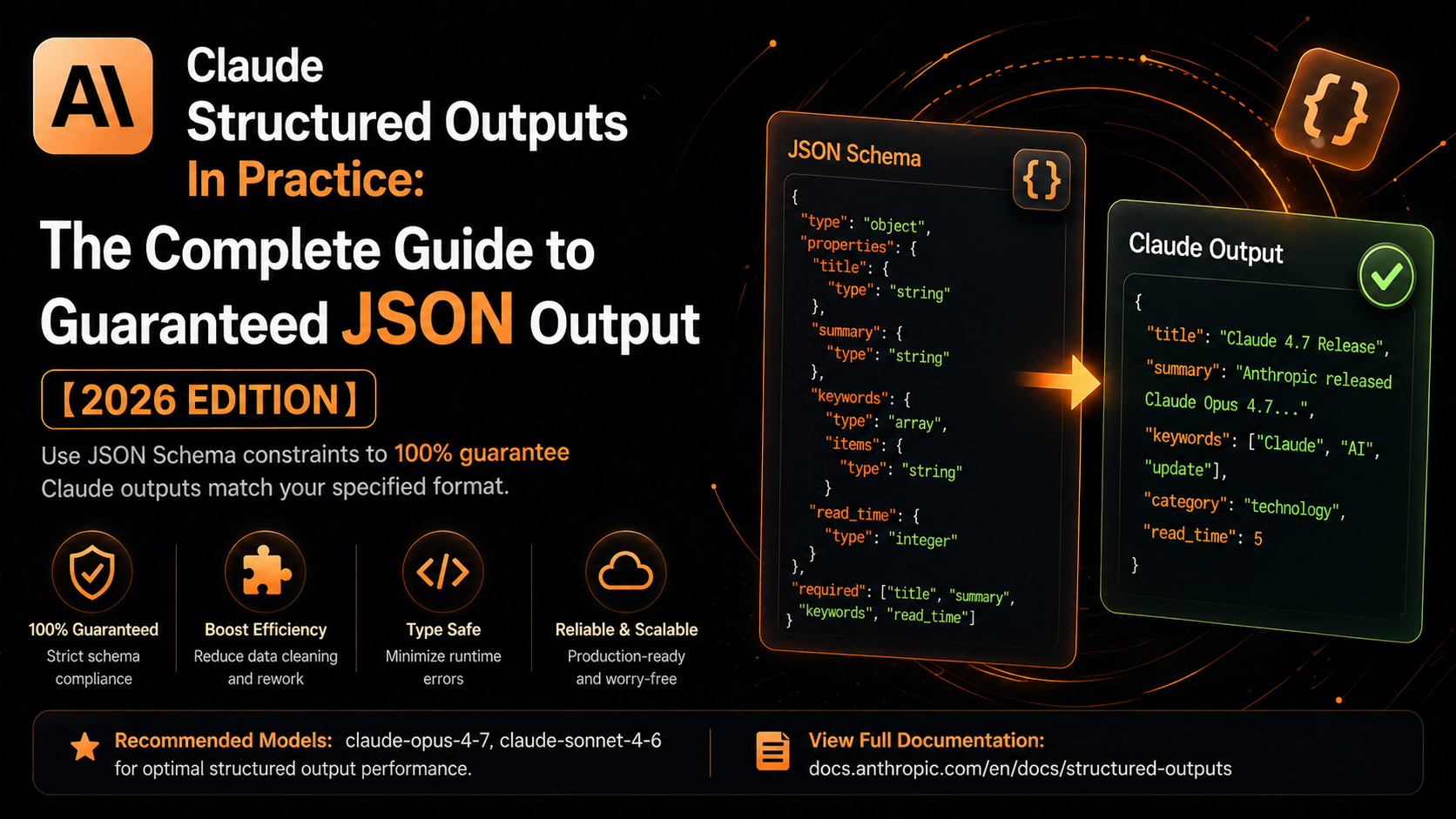
Claude API’s Structured Outputs solves this at the infrastructure level — by enforcing a JSON Schema constraint, the model is guaranteed to return data that exactly matches your specified structure. No extra fields, no missing fields. Ever.
What Are Structured Outputs?
Structured Outputs is Claude API’s schema-enforced response capability. You pass a JSON Schema with your request, and every response strictly conforms to that schema. The returned data is ready to use — no post-processing, no validation, no surprises.
Why it matters:
| Traditional Approach | Structured Outputs | |
|---|---|---|
| Format guarantee | Unreliable | 100% schema-compliant |
| Type safety | Manual validation needed | Strict type matching |
| Post-processing cost | High | Zero |
| Implementation complexity | Medium-High | Low |
How It Works Under the Hood
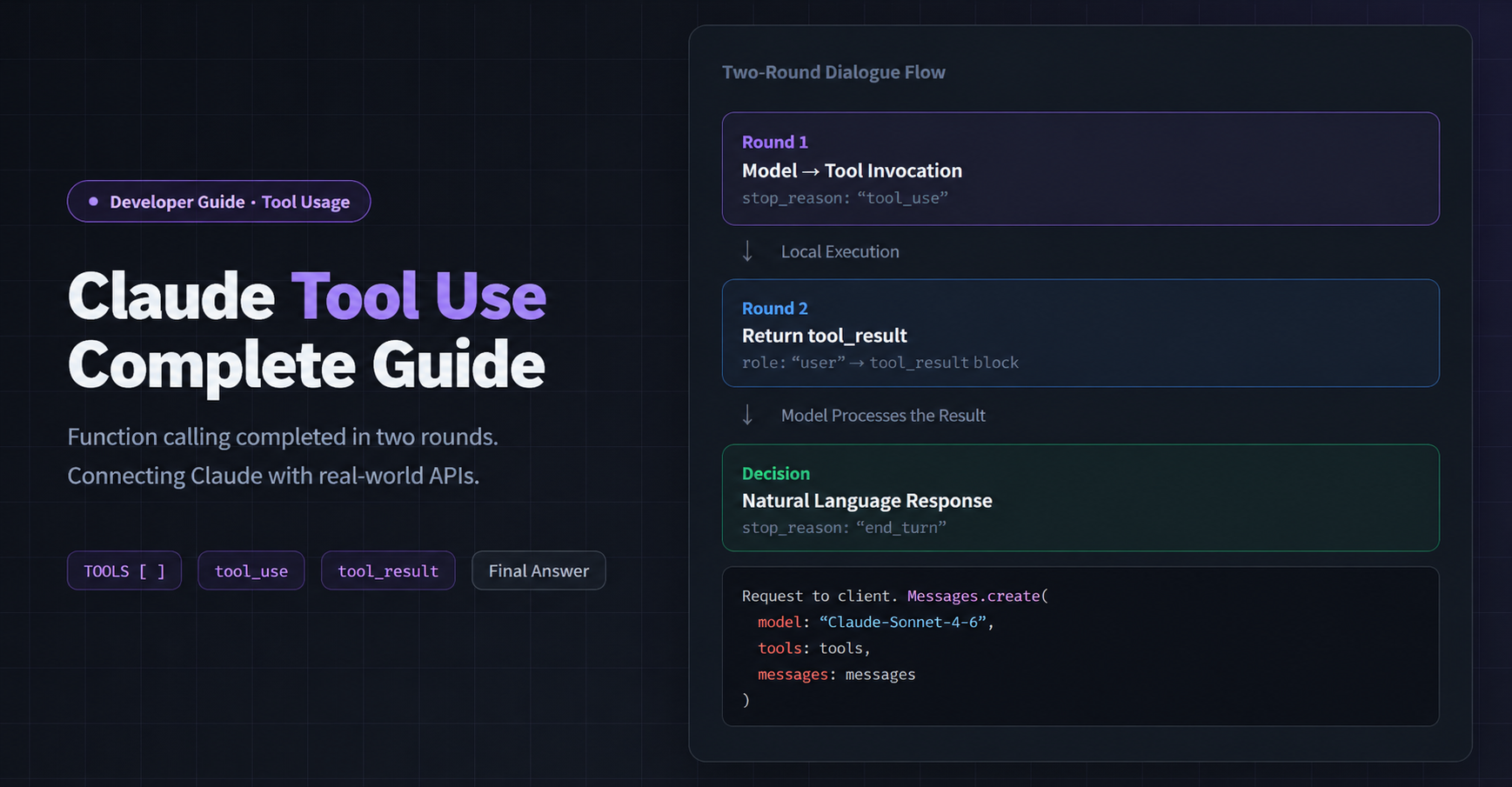
Structured Outputs leverages Claude’s Tool Use (function calling) mechanism:
- Define your JSON Schema as a virtual tool’s
input_schema - Force the model to invoke that tool via
tool_choice - Extract the structured data from the
tool_usecontent block in the response
The model never produces free-form text — it only returns structured results that conform to your schema.
Python: Getting Started
Install the SDK
pip install anthropic
pip install anthropic
Basic Example
import anthropic

client = anthropic.Anthropic(
    api_key="your-api-key",
    base_url="https://gw.claudeapi.com"
)

# Define the output structure
response_schema = {
    "type": "object",
    "properties": {
        "name":     {"type": "string",  "description": "Product name"},
        "price":    {"type": "number",  "description": "Price"},
        "in_stock": {"type": "boolean", "description": "Whether the item is in stock"},
        "tags": {
            "type": "array",
            "items": {"type": "string"},
            "description": "Product tags"
        }
    },
    "required": ["name", "price", "in_stock"]
}

message = client.messages.create(
    model="claude-sonnet-4-6",
    max_tokens=1024,
    tools=[{
        "name": "product_info",
        "description": "Return structured product information",
        "input_schema": response_schema,
    }],
    tool_choice={"type": "tool", "name": "product_info"},
    messages=[
        {"role": "user", "content": "Generate product info for iPhone 16"}
    ],
)

# The tool_use block's input field is already a dict — no json.loads needed
result = next(b.input for b in message.content if b.type == "tool_use")
print(result)
# {'name': 'iPhone 16', 'price': 999.0, 'in_stock': True, 'tags': ['smartphone', 'Apple', '5G']}
import anthropic

client = anthropic.Anthropic(
    api_key="your-api-key",
    base_url="https://gw.claudeapi.com"
)

# Define the output structure
response_schema = {
    "type": "object",
    "properties": {
        "name":     {"type": "string",  "description": "Product name"},
        "price":    {"type": "number",  "description": "Price"},
        "in_stock": {"type": "boolean", "description": "Whether the item is in stock"},
        "tags": {
            "type": "array",
            "items": {"type": "string"},
            "description": "Product tags"
        }
    },
    "required": ["name", "price", "in_stock"]
}

message = client.messages.create(
    model="claude-sonnet-4-6",
    max_tokens=1024,
    tools=[{
        "name": "product_info",
        "description": "Return structured product information",
        "input_schema": response_schema,
    }],
    tool_choice={"type": "tool", "name": "product_info"},
    messages=[
        {"role": "user", "content": "Generate product info for iPhone 16"}
    ],
)

# The tool_use block's input field is already a dict — no json.loads needed
result = next(b.input for b in message.content if b.type == "tool_use")
print(result)
# {'name': 'iPhone 16', 'price': 999.0, 'in_stock': True, 'tags': ['smartphone', 'Apple', '5G']}
Advanced: Nested Structures
Real-world applications often need deeply nested objects. Structured Outputs handles them seamlessly. Here’s an order data example:
import anthropic

client = anthropic.Anthropic(
    api_key="your-api-key",
    base_url="https://gw.claudeapi.com"
)

order_schema = {
    "type": "object",
    "properties": {
        "order_id": {"type": "string"},
        "customer": {
            "type": "object",
            "properties": {
                "name":  {"type": "string"},
                "email": {"type": "string"},
                "phone": {"type": "string"}
            },
            "required": ["name", "email"]
        },
        "items": {
            "type": "array",
            "items": {
                "type": "object",
                "properties": {
                    "product_name": {"type": "string"},
                    "quantity":     {"type": "integer"},
                    "unit_price":   {"type": "number"}
                },
                "required": ["product_name", "quantity", "unit_price"]
            }
        },
        "total_amount": {"type": "number"},
        "status": {
            "type": "string",
            "enum": ["pending", "paid", "shipped", "delivered"]
        }
    },
    "required": ["order_id", "customer", "items", "total_amount", "status"]
}

message = client.messages.create(
    model="claude-sonnet-4-6",
    max_tokens=2048,
    tools=[{
        "name": "order_info",
        "description": "Return structured order data",
        "input_schema": order_schema,
    }],
    tool_choice={"type": "tool", "name": "order_info"},
    messages=[
        {"role": "user", "content": "Generate an order with 3 items for customer John Smith"}
    ],
)

order = next(b.input for b in message.content if b.type == "tool_use")
print(f"Order ID: {order['order_id']}")
print(f"Customer: {order['customer']['name']}")
print(f"Items:    {len(order['items'])}")
print(f"Total:    {order['total_amount']}")
import anthropic

client = anthropic.Anthropic(
    api_key="your-api-key",
    base_url="https://gw.claudeapi.com"
)

order_schema = {
    "type": "object",
    "properties": {
        "order_id": {"type": "string"},
        "customer": {
            "type": "object",
            "properties": {
                "name":  {"type": "string"},
                "email": {"type": "string"},
                "phone": {"type": "string"}
            },
            "required": ["name", "email"]
        },
        "items": {
            "type": "array",
            "items": {
                "type": "object",
                "properties": {
                    "product_name": {"type": "string"},
                    "quantity":     {"type": "integer"},
                    "unit_price":   {"type": "number"}
                },
                "required": ["product_name", "quantity", "unit_price"]
            }
        },
        "total_amount": {"type": "number"},
        "status": {
            "type": "string",
            "enum": ["pending", "paid", "shipped", "delivered"]
        }
    },
    "required": ["order_id", "customer", "items", "total_amount", "status"]
}

message = client.messages.create(
    model="claude-sonnet-4-6",
    max_tokens=2048,
    tools=[{
        "name": "order_info",
        "description": "Return structured order data",
        "input_schema": order_schema,
    }],
    tool_choice={"type": "tool", "name": "order_info"},
    messages=[
        {"role": "user", "content": "Generate an order with 3 items for customer John Smith"}
    ],
)

order = next(b.input for b in message.content if b.type == "tool_use")
print(f"Order ID: {order['order_id']}")
print(f"Customer: {order['customer']['name']}")
print(f"Items:    {len(order['items'])}")
print(f"Total:    {order['total_amount']}")
Real-World Use Case: Extracting Data from Unstructured Text
One of the highest-value applications of Structured Outputs: extracting precise, typed fields from free-form text.
Here’s a resume parsing example:
import anthropic
import json

client = anthropic.Anthropic(
    api_key="your-api-key",
    base_url="https://gw.claudeapi.com"
)

resume_schema = {
    "type": "object",
    "properties": {
        "name":  {"type": "string"},
        "phone": {"type": "string"},
        "email": {"type": "string"},
        "education": {
            "type": "array",
            "items": {
                "type": "object",
                "properties": {
                    "school": {"type": "string"},
                    "degree": {"type": "string"},
                    "major":  {"type": "string"},
                    "year":   {"type": "integer"}
                }
            }
        },
        "skills": {
            "type": "array",
            "items": {"type": "string"}
        },
        "work_experience_years": {"type": "integer"}
    },
    "required": ["name", "skills"]
}

resume_text = """
Wei Zhang, Male, born 1995
Phone: +1-555-123-4567
Email: [email protected]

Education:
M.S. in Computer Science from Tsinghua University, graduated 2017

Skills: Python, Java, Machine Learning, Deep Learning, PyTorch, Distributed Systems

Experience: 2017–2024, 7 years of software development
"""

message = client.messages.create(
    model="claude-sonnet-4-6",
    max_tokens=1024,
    tools=[{
        "name": "resume_info",
        "description": "Extract structured information from resume text",
        "input_schema": resume_schema,
    }],
    tool_choice={"type": "tool", "name": "resume_info"},
    messages=[
        {"role": "user", "content": f"Extract information from the following resume:\n\n{resume_text}"}
    ],
)

resume_data = next(b.input for b in message.content if b.type == "tool_use")
print(json.dumps(resume_data, ensure_ascii=False, indent=2))
import anthropic
import json

client = anthropic.Anthropic(
    api_key="your-api-key",
    base_url="https://gw.claudeapi.com"
)

resume_schema = {
    "type": "object",
    "properties": {
        "name":  {"type": "string"},
        "phone": {"type": "string"},
        "email": {"type": "string"},
        "education": {
            "type": "array",
            "items": {
                "type": "object",
                "properties": {
                    "school": {"type": "string"},
                    "degree": {"type": "string"},
                    "major":  {"type": "string"},
                    "year":   {"type": "integer"}
                }
            }
        },
        "skills": {
            "type": "array",
            "items": {"type": "string"}
        },
        "work_experience_years": {"type": "integer"}
    },
    "required": ["name", "skills"]
}

resume_text = """
Wei Zhang, Male, born 1995
Phone: +1-555-123-4567
Email: [email protected]

Education:
M.S. in Computer Science from Tsinghua University, graduated 2017

Skills: Python, Java, Machine Learning, Deep Learning, PyTorch, Distributed Systems

Experience: 2017–2024, 7 years of software development
"""

message = client.messages.create(
    model="claude-sonnet-4-6",
    max_tokens=1024,
    tools=[{
        "name": "resume_info",
        "description": "Extract structured information from resume text",
        "input_schema": resume_schema,
    }],
    tool_choice={"type": "tool", "name": "resume_info"},
    messages=[
        {"role": "user", "content": f"Extract information from the following resume:\n\n{resume_text}"}
    ],
)

resume_data = next(b.input for b in message.content if b.type == "tool_use")
print(json.dumps(resume_data, ensure_ascii=False, indent=2))
This same pattern applies directly to contract clause extraction, product review analysis, log parsing, and more.
TypeScript / Node.js Example
import Anthropic from "@anthropic-ai/sdk";

const client = new Anthropic({
  apiKey: "your-api-key",
  baseURL: "https://gw.claudeapi.com",
});

interface ProductInfo {
  name: string;
  price: number;
  in_stock: boolean;
  tags: string[];
}

const schema = {
  type: "object",
  properties: {
    name:     { type: "string" },
    price:    { type: "number" },
    in_stock: { type: "boolean" },
    tags:     { type: "array", items: { type: "string" } },
  },
  required: ["name", "price", "in_stock"],
};

async function getProductInfo(prompt: string): Promise<ProductInfo> {
  const message = await client.messages.create({
    model: "claude-sonnet-4-6",
    max_tokens: 1024,
    tools: [{
      name: "product_info",
      description: "Return structured product information",
      input_schema: schema,
    }],
    tool_choice: { type: "tool", name: "product_info" },
    messages: [{ role: "user", content: prompt }],
  });

  const toolUse = message.content.find((b) => b.type === "tool_use");
  return (toolUse as any).input as ProductInfo;
}

const product = await getProductInfo("Generate product info for MacBook Pro");
console.log(product.name);  // Fully type-safe, no manual assertions needed
import Anthropic from "@anthropic-ai/sdk";

const client = new Anthropic({
  apiKey: "your-api-key",
  baseURL: "https://gw.claudeapi.com",
});

interface ProductInfo {
  name: string;
  price: number;
  in_stock: boolean;
  tags: string[];
}

const schema = {
  type: "object",
  properties: {
    name:     { type: "string" },
    price:    { type: "number" },
    in_stock: { type: "boolean" },
    tags:     { type: "array", items: { type: "string" } },
  },
  required: ["name", "price", "in_stock"],
};

async function getProductInfo(prompt: string): Promise<ProductInfo> {
  const message = await client.messages.create({
    model: "claude-sonnet-4-6",
    max_tokens: 1024,
    tools: [{
      name: "product_info",
      description: "Return structured product information",
      input_schema: schema,
    }],
    tool_choice: { type: "tool", name: "product_info" },
    messages: [{ role: "user", content: prompt }],
  });

  const toolUse = message.content.find((b) => b.type === "tool_use");
  return (toolUse as any).input as ProductInfo;
}

const product = await getProductInfo("Generate product info for MacBook Pro");
console.log(product.name);  // Fully type-safe, no manual assertions needed
FAQ
Q: How do I debug schema validation errors?
The most common cause is a mismatch between field names in the required array and keys in properties. Double-check them one by one.
# Wrong
"required": ["names"]   # ❌ The key in properties is "name"
"required": ["name"]    # ✅
# Wrong
"required": ["names"]   # ❌ The key in properties is "name"
"required": ["name"]    # ✅
Q: Output is truncated — incomplete JSON?
Increase max_tokens. For deeply nested structures, set it to 4096 or higher.
Q: How do I make some fields optional?
Only add required fields to the required array. Any field defined in properties but not listed in required is treated as optional.
Wrapping Up
Structured Outputs turns JSON Schema constraints from a “suggestion” into a “guarantee” via the Tool Use mechanism. It’s the right tool for any scenario requiring reliable structured output: data extraction, form generation, API response shaping, content classification, and beyond.
Integration is minimal — just swap out the base_url and everything else stays compatible with the official SDK:
client = anthropic.Anthropic(
    api_key="your-api-key",
    base_url="https://gw.claudeapi.com"   # Direct access from anywhere, no VPN required
)
client = anthropic.Anthropic(
    api_key="your-api-key",
    base_url="https://gw.claudeapi.com"   # Direct access from anywhere, no VPN required
)
Full API docs and pricing: claudeapi.com