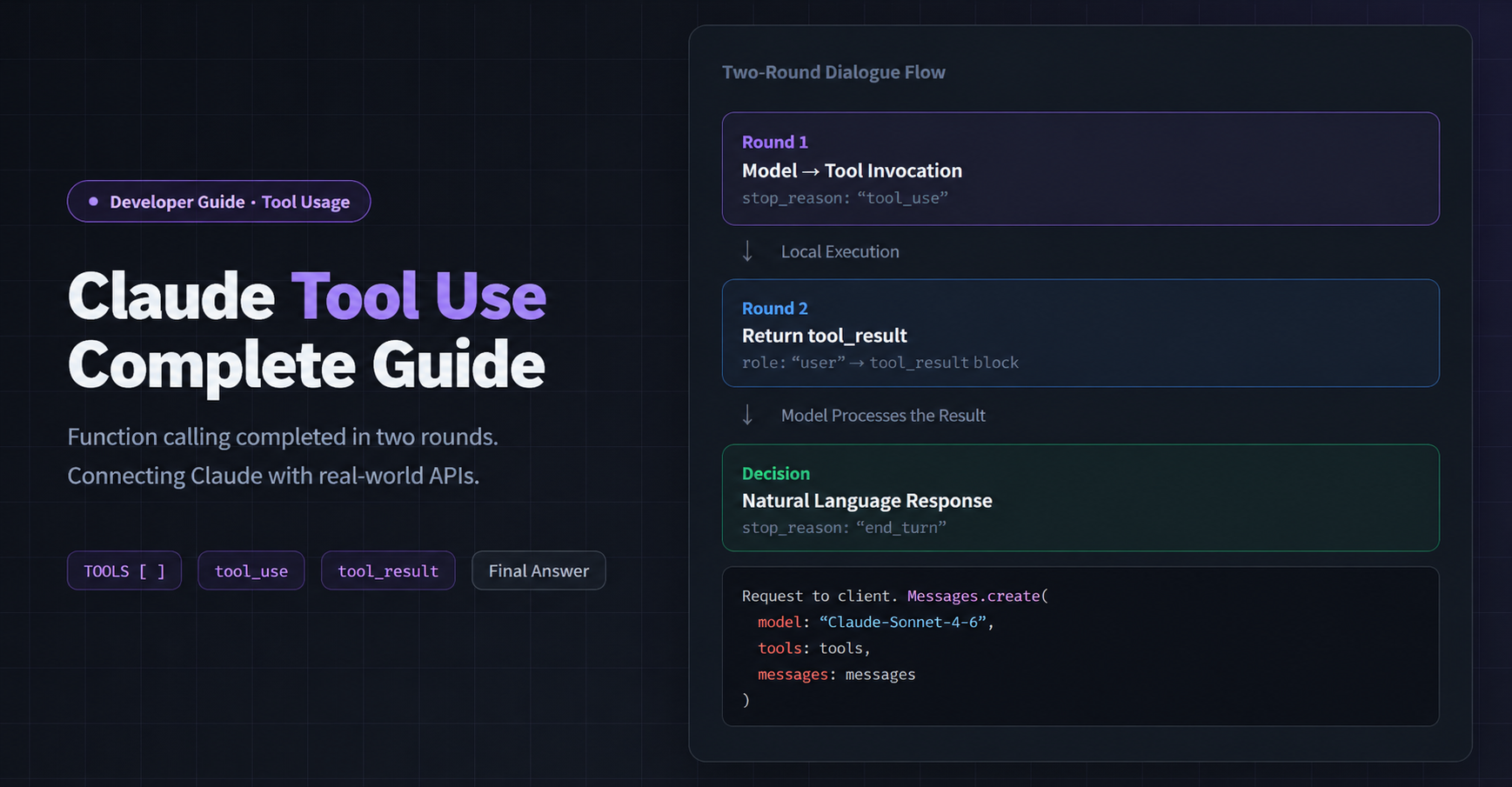
Bottom line up front: Tool Use is the core capability that turns Claude from “chatbot” into “agent that gets things done.” You define a function’s name, description, and parameter schema — Claude automatically decides when to call it and what arguments to pass. All you do is execute the function and send the result back. Claude then delivers a final answer grounded in real data. This post covers single-tool calls, parallel multi-tool calls, and real-world business scenarios, with three complete, runnable Python examples.
What Problem Does Tool Use Solve
A pure language model has a hard limitation: it can only work with the text you send it. It can’t fetch live data or interact with external systems on its own.
Tool Use breaks through that limitation:
Without Tool Use:
  User: "What's the weather in New York today?"
  Claude: "My training data has a cutoff date, so I can't provide real-time weather…"

With Tool Use:
  User: "What's the weather in New York today?"
  Claude: calls get_weather("New York") → gets 72°F, sunny
  Claude: "New York is sunny today, 72°F with 35% humidity — perfect weather!"
Without Tool Use:
  User: "What's the weather in New York today?"
  Claude: "My training data has a cutoff date, so I can't provide real-time weather…"

With Tool Use:
  User: "What's the weather in New York today?"
  Claude: calls get_weather("New York") → gets 72°F, sunny
  Claude: "New York is sunny today, 72°F with 35% humidity — perfect weather!"
Typical use cases: Real-time data queries (weather, stock prices, exchange rates), business system operations (order lookup, inventory checks), code execution, and multi-step task orchestration.
Core Concept: The Three Elements of a Tool
Every tool must define three fields. Claude uses these to decide “should I call this?” and “with what arguments?”:
{
    "name": "get_weather",
    "description": "Get current weather information for a specified city. Returns temperature (Celsius), weather condition, and humidity.",
    "input_schema": {
        "type": "object",
        "properties": {
            "city": {
                "type": "string",
                "description": "City name, e.g. New York, London, Tokyo"
            }
        },
        "required": ["city"]
    }
}
{
    "name": "get_weather",
    "description": "Get current weather information for a specified city. Returns temperature (Celsius), weather condition, and humidity.",
    "input_schema": {
        "type": "object",
        "properties": {
            "city": {
                "type": "string",
                "description": "City name, e.g. New York, London, Tokyo"
            }
        },
        "required": ["city"]
    }
}
The description makes or breaks it: the clearer you write it, the more accurately Claude will call your tool. Spell out “when to call it” and “what format the return data is in.” For environment setup, see the Claude API Python Getting Started Guide.
Example 1: Single Tool Call (Weather Query)
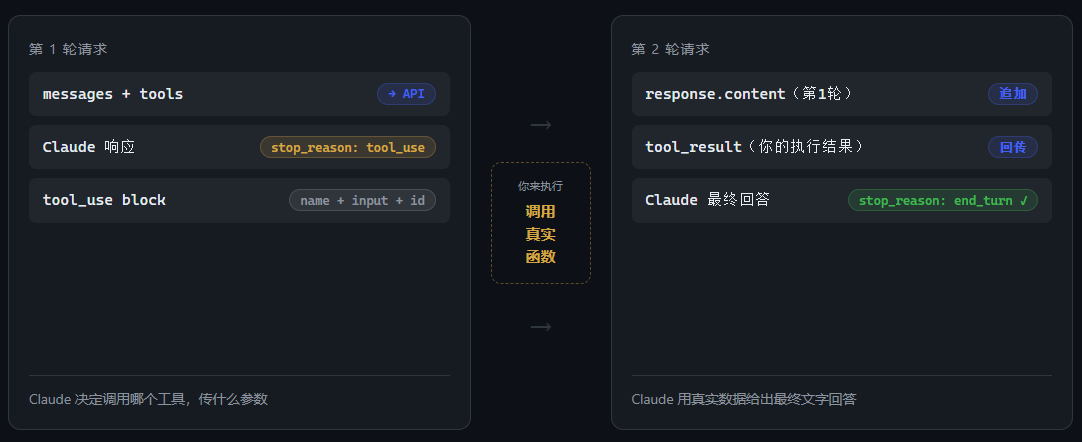
The complete Tool Use flow requires two round trips:
import anthropic, json, os
from dotenv import load_dotenv

load_dotenv()
client = anthropic.Anthropic(
    api_key=os.environ.get("CLAUDEAPI_KEY"),
    base_url="https://gw.claudeapi.com",
)

tools = [{
    "name": "get_weather",
    "description": "Get current weather information for a specified city. Returns temperature (Celsius), weather condition, and humidity.",
    "input_schema": {
        "type": "object",
        "properties": {
            "city": {"type": "string", "description": "City name, e.g. New York, London, Tokyo"}
        },
        "required": ["city"]
    }
}]

# ── Round 1: Claude decides to call a tool ─────────────────────────
response = client.messages.create(
    model="claude-sonnet-4-6",
    max_tokens=1024,
    tools=tools,
    messages=[{"role": "user", "content": "What's the weather like in New York today?"}],
)
# stop_reason: tool_use → Claude wants to call a tool
tool_block = next(b for b in response.content if b.type == "tool_use")
print(f"Tool call: {tool_block.name}, args: {tool_block.input}")
# Tool call: get_weather, args: {'city': 'New York'}

# ── Execute the function (swap in a real API call in production) ───
def get_weather(city: str) -> dict:
    mock_data = {
        "New York": {"temp": 22, "condition": "sunny", "humidity": 35},
        "London": {"temp": 16, "condition": "cloudy", "humidity": 72},
    }
    return mock_data.get(city, {"temp": 20, "condition": "unknown", "humidity": 50})

tool_result = get_weather(**tool_block.input)

# ── Round 2: Send result back, Claude gives the final answer ──────
response2 = client.messages.create(
    model="claude-sonnet-4-6",
    max_tokens=1024,
    tools=tools,
    messages=[
        {"role": "user", "content": "What's the weather like in New York today?"},
        {"role": "assistant", "content": response.content},   # Preserve Round 1 response as-is
        {"role": "user", "content": [{
            "type": "tool_result",
            "tool_use_id": tool_block.id,                     # Must match the id from Round 1
            "content": json.dumps(tool_result, ensure_ascii=False)
        }]}
    ],
)
print(f"Final answer: {response2.content[0].text}")
# New York is sunny today, 22°C with low humidity at 35% — a comfortable day!
import anthropic, json, os
from dotenv import load_dotenv

load_dotenv()
client = anthropic.Anthropic(
    api_key=os.environ.get("CLAUDEAPI_KEY"),
    base_url="https://gw.claudeapi.com",
)

tools = [{
    "name": "get_weather",
    "description": "Get current weather information for a specified city. Returns temperature (Celsius), weather condition, and humidity.",
    "input_schema": {
        "type": "object",
        "properties": {
            "city": {"type": "string", "description": "City name, e.g. New York, London, Tokyo"}
        },
        "required": ["city"]
    }
}]

# ── Round 1: Claude decides to call a tool ─────────────────────────
response = client.messages.create(
    model="claude-sonnet-4-6",
    max_tokens=1024,
    tools=tools,
    messages=[{"role": "user", "content": "What's the weather like in New York today?"}],
)
# stop_reason: tool_use → Claude wants to call a tool
tool_block = next(b for b in response.content if b.type == "tool_use")
print(f"Tool call: {tool_block.name}, args: {tool_block.input}")
# Tool call: get_weather, args: {'city': 'New York'}

# ── Execute the function (swap in a real API call in production) ───
def get_weather(city: str) -> dict:
    mock_data = {
        "New York": {"temp": 22, "condition": "sunny", "humidity": 35},
        "London": {"temp": 16, "condition": "cloudy", "humidity": 72},
    }
    return mock_data.get(city, {"temp": 20, "condition": "unknown", "humidity": 50})

tool_result = get_weather(**tool_block.input)

# ── Round 2: Send result back, Claude gives the final answer ──────
response2 = client.messages.create(
    model="claude-sonnet-4-6",
    max_tokens=1024,
    tools=tools,
    messages=[
        {"role": "user", "content": "What's the weather like in New York today?"},
        {"role": "assistant", "content": response.content},   # Preserve Round 1 response as-is
        {"role": "user", "content": [{
            "type": "tool_result",
            "tool_use_id": tool_block.id,                     # Must match the id from Round 1
            "content": json.dumps(tool_result, ensure_ascii=False)
        }]}
    ],
)
print(f"Final answer: {response2.content[0].text}")
# New York is sunny today, 22°C with low humidity at 35% — a comfortable day!
Example 2: Parallel Multi-Tool Calls
When a user’s question involves multiple tools, Claude will call several tools in a single response. Collect all results and send them back at once:
tools = [
    {
        "name": "get_weather",
        "description": "Get current weather information for a specified city. Returns temperature, weather condition, and humidity.",
        "input_schema": {
            "type": "object",
            "properties": {"city": {"type": "string", "description": "City name"}},
            "required": ["city"]
        }
    },
    {
        "name": "get_exchange_rate",
        "description": "Get the current exchange rate between two currencies.",
        "input_schema": {
            "type": "object",
            "properties": {
                "from_currency": {"type": "string", "description": "Source currency code, e.g. USD, EUR, GBP"},
                "to_currency":   {"type": "string", "description": "Target currency code"}
            },
            "required": ["from_currency", "to_currency"]
        }
    }
]

messages = [{"role": "user", "content": "What's the weather in London? Also, how much is 100 USD in euros?"}]

response = client.messages.create(
    model="claude-sonnet-4-6", max_tokens=1024, tools=tools, messages=messages
)
# Claude called both tools at once:
# → get_weather({'city': 'London'})
# → get_exchange_rate({'from_currency': 'USD', 'to_currency': 'EUR'})

# Collect all tool results and send back in one shot
# (Important: all tool_results go in the SAME user message)
tool_results = []
for block in response.content:
    if block.type == "tool_use":
        result = TOOL_MAP[block.name](**block.input)
        tool_results.append({
            "type": "tool_result",
            "tool_use_id": block.id,
            "content": json.dumps(result, ensure_ascii=False)
        })

messages.append({"role": "assistant", "content": response.content})
messages.append({"role": "user", "content": tool_results})

response2 = client.messages.create(
    model="claude-sonnet-4-6", max_tokens=1024, tools=tools, messages=messages
)
# London is cloudy today, around 16°C with 72% humidity.
# 100 USD is approximately 92 euros (rate: 0.92).
tools = [
    {
        "name": "get_weather",
        "description": "Get current weather information for a specified city. Returns temperature, weather condition, and humidity.",
        "input_schema": {
            "type": "object",
            "properties": {"city": {"type": "string", "description": "City name"}},
            "required": ["city"]
        }
    },
    {
        "name": "get_exchange_rate",
        "description": "Get the current exchange rate between two currencies.",
        "input_schema": {
            "type": "object",
            "properties": {
                "from_currency": {"type": "string", "description": "Source currency code, e.g. USD, EUR, GBP"},
                "to_currency":   {"type": "string", "description": "Target currency code"}
            },
            "required": ["from_currency", "to_currency"]
        }
    }
]

messages = [{"role": "user", "content": "What's the weather in London? Also, how much is 100 USD in euros?"}]

response = client.messages.create(
    model="claude-sonnet-4-6", max_tokens=1024, tools=tools, messages=messages
)
# Claude called both tools at once:
# → get_weather({'city': 'London'})
# → get_exchange_rate({'from_currency': 'USD', 'to_currency': 'EUR'})

# Collect all tool results and send back in one shot
# (Important: all tool_results go in the SAME user message)
tool_results = []
for block in response.content:
    if block.type == "tool_use":
        result = TOOL_MAP[block.name](**block.input)
        tool_results.append({
            "type": "tool_result",
            "tool_use_id": block.id,
            "content": json.dumps(result, ensure_ascii=False)
        })

messages.append({"role": "assistant", "content": response.content})
messages.append({"role": "user", "content": tool_results})

response2 = client.messages.create(
    model="claude-sonnet-4-6", max_tokens=1024, tools=tools, messages=messages
)
# London is cloudy today, around 16°C with 72% humidity.
# 100 USD is approximately 92 euros (rate: 0.92).
Example 3: Business Scenario — Order Lookup + Error Handling
In real-world scenarios, tools can return errors. Claude gracefully converts structured errors into user-friendly responses:
def get_order_status(order_id: str) -> dict:
    ORDERS = {
        "ORD-12345678": {
            "status": "in transit", "carrier": "FedEx",
            "tracking": "FX1234567890", "eta": "2026-04-29"
        }
    }
    if order_id in ORDERS:
        return {"success": True, "order_id": order_id, **ORDERS[order_id]}
    # Order not found — return a structured error
    return {"success": False, "error": f"Order {order_id} not found. Please check the order number."}
def get_order_status(order_id: str) -> dict:
    ORDERS = {
        "ORD-12345678": {
            "status": "in transit", "carrier": "FedEx",
            "tracking": "FX1234567890", "eta": "2026-04-29"
        }
    }
    if order_id in ORDERS:
        return {"success": True, "order_id": order_id, **ORDERS[order_id]}
    # Order not found — return a structured error
    return {"success": False, "error": f"Order {order_id} not found. Please check the order number."}
Output:
# Successful lookup
User: Can you check the status of order ORD-12345678?
Claude: Your order ORD-12345678 is currently in transit via FedEx,
        tracking number FX1234567890, estimated delivery April 29.

# Order not found
User: My order number is ORD-00000000, can you look it up?
Claude: I'm sorry, but order ORD-00000000 wasn't found in the system.
        Please double-check the order number, or contact support for further help.
# Successful lookup
User: Can you check the status of order ORD-12345678?
Claude: Your order ORD-12345678 is currently in transit via FedEx,
        tracking number FX1234567890, estimated delivery April 29.

# Order not found
User: My order number is ORD-00000000, can you look it up?
Claude: I'm sorry, but order ORD-00000000 wasn't found in the system.
        Please double-check the order number, or contact support for further help.
When Claude receives success: false, it doesn’t break — it gracefully translates the error into a helpful user message. You can delegate error-handling UX to Claude instead of hardcoding every edge case in your application logic.
4 Common Pitfalls
Pitfall 1: Only sending one round, never getting a final answer
Tool Use requires two round trips. Round 1: Claude returns stop_reason: tool_use and you execute the function. Round 2: you send back the tool_result and only then get stop_reason: end_turn with the final text response.
Pitfall 2: Not appending response.content from Round 1 as-is
The Round 2 messages array must include the complete response.content from Round 1 (containing both the text block and the tool_use block) as the assistant message. Omitting it will cause an API error.
Pitfall 3: Sending multi-tool results in separate messages
All tool_result items must go inside a single user message’s content array. Splitting them across multiple messages triggers a message structure error from the API. For common error solutions, see the Claude API Error Troubleshooting Guide.
Pitfall 4: Descriptions too vague — Claude calls the wrong tool or none at all
A description should clearly state three things: when to call it, parameter format, and what it returns. “Get weather” is far less effective than “Call when the user asks about a city’s current weather. Returns temperature (Celsius), weather condition, and humidity.”
Combining with Prompt Caching
Your tool definitions (the tools array) are typically identical across requests — making them an ideal target for Prompt Caching. Add "cache_control": {"type": "ephemeral"} to the last tool in the array. The more tools you have and the more frequently you call the API, the bigger the savings. See Prompt Caching in Practice for details.
FAQ
Q: Which Claude models support Tool Use?
A: All major models on ClaudeAPI support it, including claude-opus-4-6, claude-sonnet-4-6, and claude-haiku-4-5. Sonnet 4.6 offers the best balance of accuracy and speed for most production use cases.
Q: Claude keeps calling tools and never gives a final answer — what do I do?
A: Check stop_reason in a loop. If consecutive tool calls exceed a threshold (we recommend 5), force a stop. Alternatively, add explicit instructions in the system prompt like “Give a final answer after at most N tool calls.”
Q: How do I force Claude to call a specific tool?
A: Add tool_choice={"type": "tool", "name": "your_tool_name"} to your request. Claude will be forced to call that tool. The default is {"type": "auto"} (Claude decides on its own).
Sign up for ClaudeAPI to get your API key. Replace CLAUDEAPI_KEY in the code with your key, and you’ll have your first tool call running in under three minutes. For more setup details, see the Claude API Python Getting Started Guide.
Published by the ClaudeAPI team.