Claude API 提示词缓存实战:让重复内容省掉 90% Token 费用
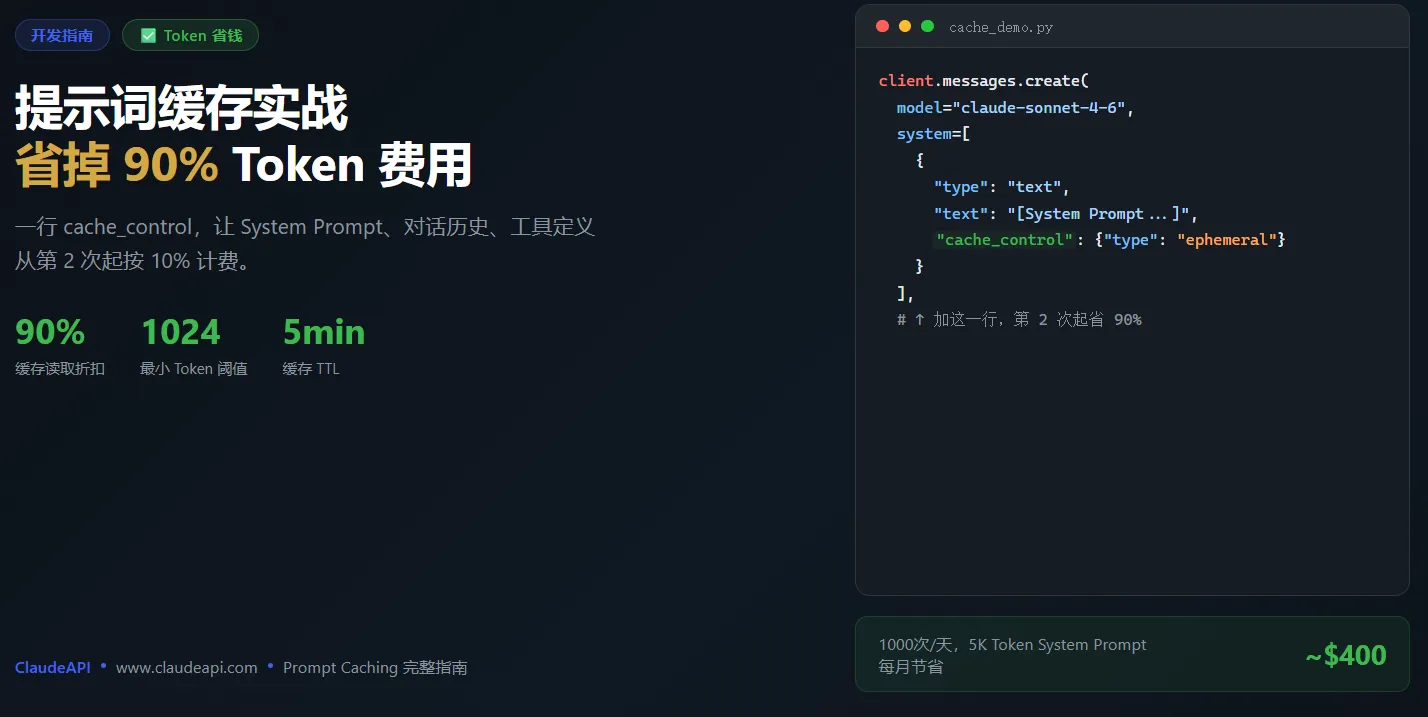
结论先说: 如果你的请求里有重复发送的长内容——比如固定的 System Prompt、知识库片段、或者多轮对话的历史——只需在代码里加一行 "cache_control": {"type": "ephemeral"},同样的内容从第二次起就只收 10% 的输入费用。对于 System Prompt 超过 1000 Token 的应用,这个改动可以把 Token 成本压低 50%-90%。
什么是 Prompt Caching
每次你调用 Claude API,平台都会把你发送的所有内容(System Prompt + 对话历史 + 工具定义)从头处理一遍——即使上一次请求里这些内容完全一样。Prompt Caching 就是让 Claude 把这些重复内容在服务端缓存起来,后续请求命中缓存时,按大幅折扣价计费,而不是重新处理。
工作原理很直觉:
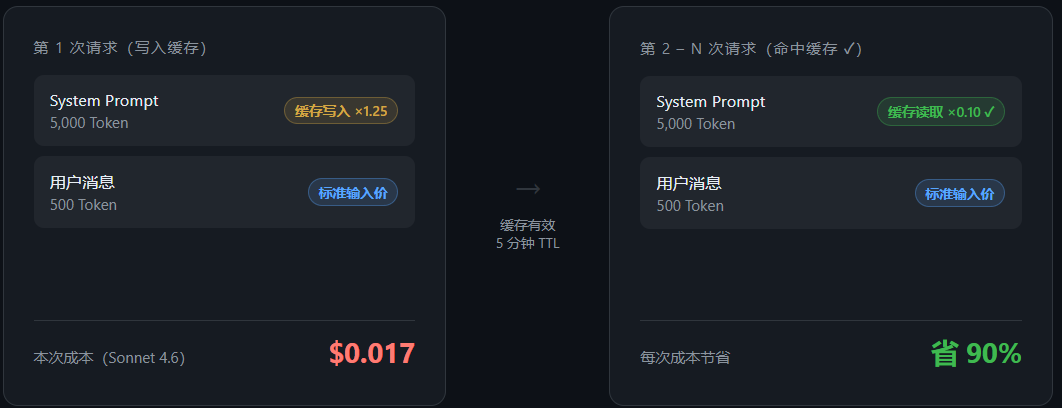
第 1 次请求:写入缓存
  [System Prompt 5000 Token] + [用户消息 50 Token]
  计费:System Prompt → 缓存写入价(标准输入价 ×1.25)

第 2-N 次请求:命中缓存
  [相同 System Prompt] + [新的用户消息 50 Token]
  计费:System Prompt → 缓存读取价(标准输入价 ×0.10)✅ 省了 90%
第 1 次请求:写入缓存
  [System Prompt 5000 Token] + [用户消息 50 Token]
  计费:System Prompt → 缓存写入价(标准输入价 ×1.25)

第 2-N 次请求:命中缓存
  [相同 System Prompt] + [新的用户消息 50 Token]
  计费:System Prompt → 缓存读取价(标准输入价 ×0.10)✅ 省了 90%
触发缓存的两个必要条件
哪些 Claude 模型支持 Prompt Caching
| 模型 | 最小缓存阈值 |
|---|---|
| claude-opus-4-6 | 1024 Token |
| claude-sonnet-4-6 | 1024 Token |
| claude-sonnet-4-5 | 1024 Token |
| claude-haiku-4-5-20251001 | 2048 Token |
不满足阈值的内容即使加了标记也不会被缓存,按普通输入价格计费。模型 ID 写法与接入教程一致,可参考 Claude Code 国内接入教程。
在正确位置添加 cache_control
cache_control 标记决定「缓存到哪里」——它会把该消息及其之前的所有内容都纳入缓存范围。因此,你应该把标记加在你想缓存的最后一块内容上。
实战一:缓存长 System Prompt(最高频场景)
适用场景: 每次请求都带着同一份 System Prompt(角色设定、业务规则、知识文档),内容超过 1000 Token。这是绝大多数客服机器人、知识库问答、文档分析应用的标准场景。
# 代码来源:Anthropic 官方文档 — Prompt Caching
# ClaudeAPI 接入:只需将 base_url 设为 https://gw.claudeapi.com
import anthropic
import os

client = anthropic.Anthropic(
    api_key=os.environ.get("CLAUDEAPI_KEY"),
    base_url="https://gw.claudeapi.com",
)

response = client.messages.create(
    model="claude-sonnet-4-6",
    max_tokens=1024,
    system=[
        {
            "type": "text",
            "text": "你是一个专业的客服助手,以下是我们产品的完整知识库:\n\n[产品文档 3000 字...]"
        },
        {
            "type": "text",
            "text": "[FAQ 列表 2000 字...]\n\n请根据以上知识库回答用户问题,不要编造信息。",
            "cache_control": {"type": "ephemeral"}  # ← 加这一行,缓存整个 system
        }
    ],
    messages=[
        {"role": "user", "content": "退款要多少天?"}
    ],
)

# 从响应确认缓存是否命中
usage = response.usage
print(f"缓存写入:{usage.cache_creation_input_tokens} Token")
print(f"缓存命中:{usage.cache_read_input_tokens} Token")
print(f"普通输入:{usage.input_tokens} Token")
# 代码来源:Anthropic 官方文档 — Prompt Caching
# ClaudeAPI 接入:只需将 base_url 设为 https://gw.claudeapi.com
import anthropic
import os

client = anthropic.Anthropic(
    api_key=os.environ.get("CLAUDEAPI_KEY"),
    base_url="https://gw.claudeapi.com",
)

response = client.messages.create(
    model="claude-sonnet-4-6",
    max_tokens=1024,
    system=[
        {
            "type": "text",
            "text": "你是一个专业的客服助手,以下是我们产品的完整知识库:\n\n[产品文档 3000 字...]"
        },
        {
            "type": "text",
            "text": "[FAQ 列表 2000 字...]\n\n请根据以上知识库回答用户问题,不要编造信息。",
            "cache_control": {"type": "ephemeral"}  # ← 加这一行,缓存整个 system
        }
    ],
    messages=[
        {"role": "user", "content": "退款要多少天?"}
    ],
)

# 从响应确认缓存是否命中
usage = response.usage
print(f"缓存写入:{usage.cache_creation_input_tokens} Token")
print(f"缓存命中:{usage.cache_read_input_tokens} Token")
print(f"普通输入:{usage.input_tokens} Token")
第一次请求 cache_creation_input_tokens 会有值(写入缓存),之后 cache_read_input_tokens 持续命中,直到 5 分钟不活跃后缓存过期。
实战二:多轮对话缓存历史消息
适用场景: 对话轮次多,每轮都要把之前所有历史发给 Claude。随着对话增长,成本呈线性增加——Prompt Caching 可以把已缓存的历史部分压到 10%。
关键技巧: 把 cache_control 加在倒数第二条消息上(最新的用户消息不缓存,因为它每次都不一样;但历史消息可以缓存)。
# 代码来源:Anthropic 官方文档 — Prompt Caching(多轮对话)
import anthropic
import os

client = anthropic.Anthropic(
    api_key=os.environ.get("CLAUDEAPI_KEY"),
    base_url="https://gw.claudeapi.com",
)

def chat_with_cache(history: list, new_message: str):
    """
    history: 已有的对话历史(list of message dicts)
    new_message: 本轮新的用户消息
    """
    # 在历史消息的最后一条加上缓存标记
    if history:
        last_msg = history[-1]
        last_msg_with_cache = {
            "role": last_msg["role"],
            "content": [
                {
                    "type": "text",
                    "text": last_msg["content"] if isinstance(last_msg["content"], str)
                            else last_msg["content"][0]["text"],
                    "cache_control": {"type": "ephemeral"}  # 缓存历史部分
                }
            ]
        }
        messages = history[:-1] + [last_msg_with_cache]
    else:
        messages = []

    messages.append({"role": "user", "content": new_message})

    return client.messages.create(
        model="claude-sonnet-4-6",
        max_tokens=1024,
        messages=messages,
    )
# 代码来源:Anthropic 官方文档 — Prompt Caching(多轮对话)
import anthropic
import os

client = anthropic.Anthropic(
    api_key=os.environ.get("CLAUDEAPI_KEY"),
    base_url="https://gw.claudeapi.com",
)

def chat_with_cache(history: list, new_message: str):
    """
    history: 已有的对话历史(list of message dicts)
    new_message: 本轮新的用户消息
    """
    # 在历史消息的最后一条加上缓存标记
    if history:
        last_msg = history[-1]
        last_msg_with_cache = {
            "role": last_msg["role"],
            "content": [
                {
                    "type": "text",
                    "text": last_msg["content"] if isinstance(last_msg["content"], str)
                            else last_msg["content"][0]["text"],
                    "cache_control": {"type": "ephemeral"}  # 缓存历史部分
                }
            ]
        }
        messages = history[:-1] + [last_msg_with_cache]
    else:
        messages = []

    messages.append({"role": "user", "content": new_message})

    return client.messages.create(
        model="claude-sonnet-4-6",
        max_tokens=1024,
        messages=messages,
    )
随着对话轮次增加,越来越多的 Token 会走缓存读取价(标准价的 10%),整体对话成本增速大幅放缓。
实战三:缓存 Tool 定义
适用场景: 定义了大量工具(tools),每次请求都要发送相同的工具 JSON。工具定义可能占数千 Token,完全值得缓存。
# 代码来源:Anthropic 官方文档 — Prompt Caching(Tool Use 场景)
import anthropic
import os

client = anthropic.Anthropic(
    api_key=os.environ.get("CLAUDEAPI_KEY"),
    base_url="https://gw.claudeapi.com",
)

# 给 tools 列表的最后一个工具加上 cache_control
tools = [
    {
        "name": "search_knowledge_base",
        "description": "在知识库中搜索相关内容...[详细描述]",
        "input_schema": {
            "type": "object",
            "properties": {
                "query": {"type": "string", "description": "搜索关键词"}
            },
            "required": ["query"]
        }
    },
    {
        "name": "get_order_status",
        "description": "查询订单状态...[详细描述]",
        "input_schema": {
            "type": "object",
            "properties": {
                "order_id": {"type": "string"}
            },
            "required": ["order_id"]
        },
        "cache_control": {"type": "ephemeral"}  # 加在最后一个工具上,缓存整个 tools 列表
    }
]

response = client.messages.create(
    model="claude-sonnet-4-6",
    max_tokens=1024,
    tools=tools,
    messages=[{"role": "user", "content": "帮我查一下订单 #12345"}],
)
# 代码来源:Anthropic 官方文档 — Prompt Caching(Tool Use 场景)
import anthropic
import os

client = anthropic.Anthropic(
    api_key=os.environ.get("CLAUDEAPI_KEY"),
    base_url="https://gw.claudeapi.com",
)

# 给 tools 列表的最后一个工具加上 cache_control
tools = [
    {
        "name": "search_knowledge_base",
        "description": "在知识库中搜索相关内容...[详细描述]",
        "input_schema": {
            "type": "object",
            "properties": {
                "query": {"type": "string", "description": "搜索关键词"}
            },
            "required": ["query"]
        }
    },
    {
        "name": "get_order_status",
        "description": "查询订单状态...[详细描述]",
        "input_schema": {
            "type": "object",
            "properties": {
                "order_id": {"type": "string"}
            },
            "required": ["order_id"]
        },
        "cache_control": {"type": "ephemeral"}  # 加在最后一个工具上,缓存整个 tools 列表
    }
]

response = client.messages.create(
    model="claude-sonnet-4-6",
    max_tokens=1024,
    tools=tools,
    messages=[{"role": "user", "content": "帮我查一下订单 #12345"}],
)
省钱测算:不同规模的节省对比
假设你的应用每天有 1000 次请求,每次请求包含固定 System Prompt 5000 Token(每次相同,可缓存)+ 用户消息 500 Token:
| 方案 | System Prompt 计费 | 每日费用(Sonnet 4.6,$3/MTok) | 每月费用 |
|---|---|---|---|
| 不用 Prompt Caching | 5000 Token × $3 × 1000次 | $15.00 | ~$450 |
| 用 Prompt Caching | 写入1次 + 读取999次(×0.10) | $1.52 | ~$46 |
| 节省 | — | $13.48/天(省 90%) | ~$404/月 |
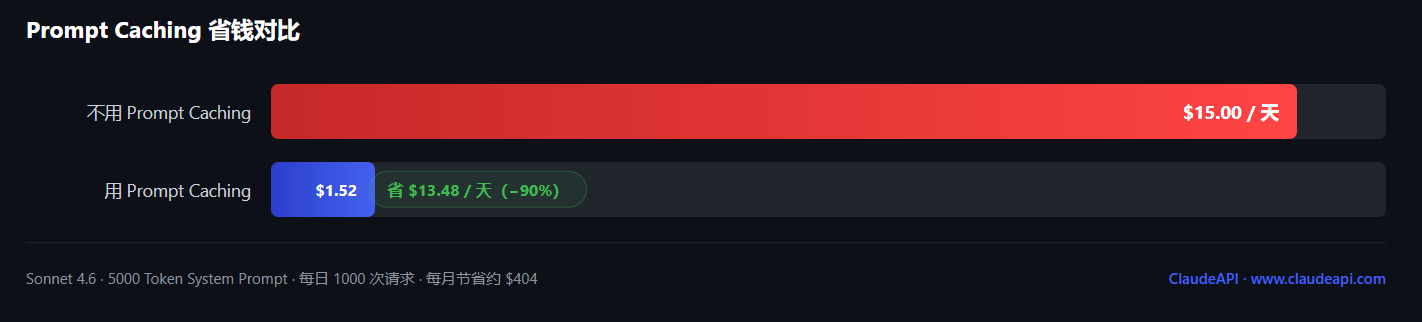
盈亏平衡点: 同一缓存内容被发送 2 次以上 就开始省钱。第 1 次写入是标准价的 1.25 倍,第 2 次起每次只收 0.1 倍——1.39 次请求后回本。
想了解各模型完整定价,参考 Claude API 价格完全指南。
4 个高频踩坑
坑 1:内容低于最小阈值,缓存不触发
System Prompt 只有 900 Token,低于 1024 的最小阈值,缓存不会生效。解法:检查实际 Token 数量(可从 usage.input_tokens 读取),确保超过阈值。
坑 2:5 分钟没有请求,缓存失效
缓存 TTL 是 5 分钟,每次命中刷新。用户超过 5 分钟不活跃,缓存会过期,下次请求需要重新写入(产生一次写入费用)。这不是 bug,了解这个行为即可。
坑 3:System Prompt 有动态变量,缓存无法命中
缓存是基于前缀的完全匹配。只要 cache_control 之前的内容有任何变化(哪怕一个空格),就无法命中。固定 System Prompt 不要插入动态变量(如用户 ID、当前时间)。把动态内容放到 user message 里。
坑 4:误以为 Batch API 和 Prompt Caching 折扣不能叠加
两者可以叠加。Batch API 提供 50% 折扣,Prompt Caching 缓存读取再提供 90% 折扣,互不影响,同时有效。
常见问题
Q:ClaudeAPI 中继支持 Prompt Caching 吗?
A:支持。ClaudeAPI 完整转发 Anthropic API 的所有功能,包括 Prompt Caching。只需把 base_url 设为 https://gw.claudeapi.com,其余代码与官方文档一致,无需额外配置。
Q:缓存是多个用户共享的吗?有数据泄露风险吗?
A:不共享。缓存按 API Key + 模型隔离,不同 API Key 之间完全独立,不存在跨用户的数据泄露风险。
Q:如何确认缓存是否命中?
A:查看响应的 usage 字段:cache_read_input_tokens > 0 表示有内容命中了缓存;cache_creation_input_tokens > 0 表示本次写入了新缓存。建议把这两个值记录到日志,用于监控缓存命中率和计算实际节省。
已有 ClaudeAPI 账号?直接把 base_url 改为 https://gw.claudeapi.com,今天就可以开启 Prompt Caching。注册 ClaudeAPI 获取 API Key,查看价格 计算你的实际节省。
本文由 ClaudeAPI 团队出品。