
Claude Memory Tool in Practice: The Complete Guide to Giving Your Agent Cross-Session Memory
Anyone who’s built an Agent has hit this wall: the user says “I prefer dark mode and short answers” in session one, and the model has zero recollection by session two. Stuffing preferences into the system prompt is a band-aid. Building your own RAG pipeline is a mountain of engineering.
On September 29, 2025, Anthropic released the memory_20250818 tool (official docs) — a much lighter approach than rolling your own RAG. It lets Claude treat memory as local files it can read and write. Combined with context editing, Anthropic’s internal benchmarks on a 100-turn web search task showed 84% token savings and a 39% performance improvement.
This post walks through the full picture: mechanism → command schema → minimal implementation → comparison with RAG → security → API access. Complete, copy-paste-ready code is included at the end.
1. Core Mechanism: Client-Side Storage with a File System Metaphor
Understanding the memory tool comes down to one sentence: the model only issues read/write instructions — the actual storage lives on your side.
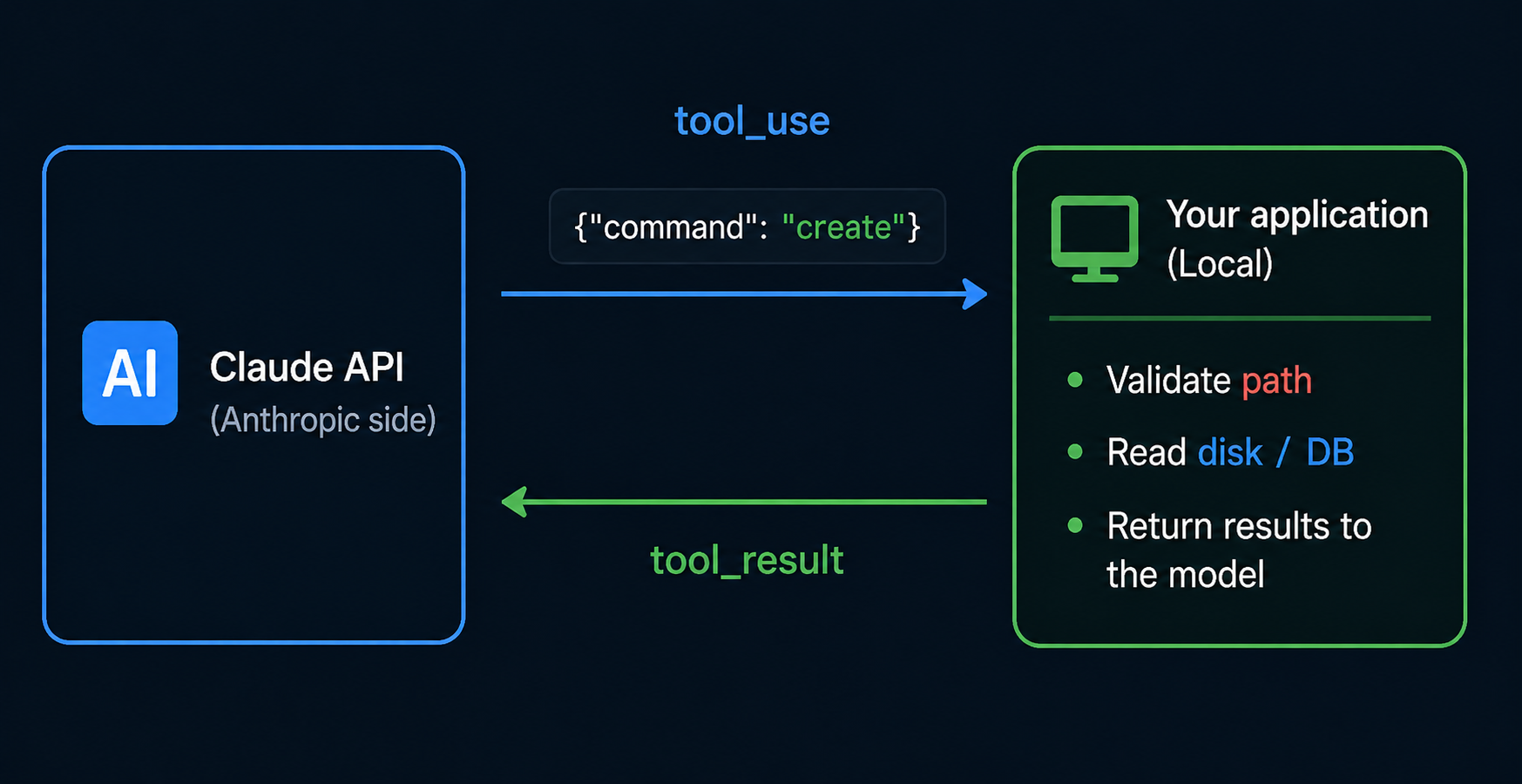
This architecture delivers three immediate benefits:
| Dimension | What It Means |
|---|---|
| Data sovereignty | User data never leaves your server. Where it’s stored, whether it’s encrypted, how long it’s retained — all your call |
| Auditability | Every memory operation is a visible tool_use/tool_result block that you can log directly |
| Storage flexibility | Local files, PostgreSQL, Redis, S3, encrypted volumes — just implement one abstract class |
There’s a deliberate reason Anthropic designed memory as a “file system” rather than a “key-value store” — Claude has already been trained extensively on file operations (view / create / str_replace), so no additional instruction is needed. Anthropic also auto-injects this into the system prompt: “IMPORTANT: ALWAYS VIEW YOUR MEMORY DIRECTORY BEFORE DOING ANYTHING ELSE.” — meaning the model proactively checks memory at the start of every session.
2. The 6 Commands: Full Schema and Tool Result Conventions
The memory tool’s command set is deliberately minimal — just 6 commands, but they cover everything. Here’s the JSON structure the model will send you, and the response format you need to follow:
2.1 view — Read a Directory or File
{
  "command": "view",
  "path": "/memories",
  "view_range": [1, 10]
}
{
  "command": "view",
  "path": "/memories",
  "view_range": [1, 10]
}
- If the path is a directory → return the file listing (with sizes)
- If the path is a file → return content;
view_rangeis optional, 1-based, closed interval view_range: [-1, -1]means the last line
2.2 create — Create or Overwrite a File
{
  "command": "create",
  "path": "/memories/preferences.md",
  "file_text": "## User Preferences\n- Theme: dark\n- Verbose: false\n"
}
{
  "command": "create",
  "path": "/memories/preferences.md",
  "file_text": "## User Preferences\n- Theme: dark\n- Verbose: false\n"
}
Creates if it doesn’t exist, overwrites entirely if it does — so when Claude wants to “append,” it actually does a view first, then a create.
2.3 str_replace — Exact String Replacement
{
  "command": "str_replace",
  "path": "/memories/preferences.md",
  "old_str": "Theme: dark",
  "new_str": "Theme: light"
}
{
  "command": "str_replace",
  "path": "/memories/preferences.md",
  "old_str": "Theme: dark",
  "new_str": "Theme: light"
}
old_str must be unique within the file. If not, return an error:
No replacement was performed. Multiple occurrences of old_str ... Please ensure it is unique
If you don’t match this exact text format, the model will retry and won’t converge.
2.4 insert — Insert at a Specific Line
{
  "command": "insert",
  "path": "/memories/todo.md",
  "insert_line": 2,
  "insert_text": "- [ ] Review memory tool docs\n"
}
{
  "command": "insert",
  "path": "/memories/todo.md",
  "insert_line": 2,
  "insert_text": "- [ ] Review memory tool docs\n"
}
insert_line is 0-based (inserting before line 0 = beginning of file). On out-of-bounds, return:
Error: Invalid insert_line parameter: ... It should be within the range of lines of the file: [0, N]
2.5 delete — Recursive Delete
{ "command": "delete", "path": "/memories/old-notes" }
{ "command": "delete", "path": "/memories/old-notes" }
Deletes files directly, directories recursively — which is why path validation is a critical security boundary (see Section 6).
2.6 rename — Rename or Move
{ "command": "rename", "old_path": "/memories/draft.md", "new_path": "/memories/final.md" }
{ "command": "rename", "old_path": "/memories/draft.md", "new_path": "/memories/final.md" }
Must return an error if new_path already exists — no silent overwriting:
Error: The destination /memories/final.md already exists
3. Minimal Working Implementation: 30 Lines of Python
Here’s a minimal example you can actually run (using local file storage). For production, consider using the SDK’s BetaAbstractMemoryTool abstract class, but start with the plain version to understand the mechanics:
import os
import json
from pathlib import Path
from anthropic import Anthropic

MEMORY_ROOT = Path("./agent_memory").resolve()
MEMORY_ROOT.mkdir(exist_ok=True)

def safe_path(p: str) -> Path:
    """Prevent directory traversal: /memories/foo → ./agent_memory/foo, must stay under ROOT"""
    rel = p.lstrip("/").removeprefix("memories/").removeprefix("memories")
    target = (MEMORY_ROOT / rel).resolve()
    target.relative_to(MEMORY_ROOT)  # Raises ValueError if traversal detected
    return target

def handle_memory(cmd: dict) -> str:
    op = cmd["command"]
    path = safe_path(cmd["path"])

    if op == "view":
        if path.is_dir():
            return "\n".join(f"{f.name} ({f.stat().st_size}B)" for f in path.iterdir())
        text = path.read_text(encoding="utf-8")
        if "view_range" in cmd:
            lines = text.splitlines()
            a, b = cmd["view_range"]
            text = "\n".join(lines[a-1:b])
        return text

    if op == "create":
        path.parent.mkdir(parents=True, exist_ok=True)
        path.write_text(cmd["file_text"], encoding="utf-8")
        return f"File created: {cmd['path']}"

    if op == "str_replace":
        text = path.read_text(encoding="utf-8")
        if text.count(cmd["old_str"]) != 1:
            return f"No replacement performed. Found {text.count(cmd['old_str'])} occurrences."
        path.write_text(text.replace(cmd["old_str"], cmd["new_str"]), encoding="utf-8")
        return "Replaced."

    if op == "insert":
        lines = path.read_text(encoding="utf-8").splitlines(keepends=True)
        i = cmd["insert_line"]
        if not 0 <= i <= len(lines):
            return f"Error: Invalid insert_line {i}. Range [0, {len(lines)}]."
        lines.insert(i, cmd["insert_text"])
        path.write_text("".join(lines), encoding="utf-8")
        return "Inserted."

    if op == "delete":
        if path.is_dir():
            import shutil; shutil.rmtree(path)
        else:
            path.unlink()
        return "Deleted."

    if op == "rename":
        new = safe_path(cmd["new_path"])
        if new.exists():
            return f"Error: The destination {cmd['new_path']} already exists"
        path.rename(new)
        return "Renamed."

    return f"Unknown command: {op}"


client = Anthropic(
    api_key=os.environ["CLAUDEAPI_KEY"],
    base_url="https://gw.claudeapi.com",
)

messages = [{"role": "user", "content": "Remember this: I prefer short answers and dark mode."}]

while True:
    resp = client.beta.messages.create(
        model="claude-sonnet-4-6",
        max_tokens=2048,
        betas=["context-management-2025-06-27"],
        tools=[{"type": "memory_20250818", "name": "memory"}],
        messages=messages,
    )

    if resp.stop_reason != "tool_use":
        print(resp.content[0].text)
        break

    # Execute memory commands issued by the model
    tool_results = []
    for block in resp.content:
        if block.type == "tool_use" and block.name == "memory":
            result = handle_memory(block.input)
            tool_results.append({
                "type": "tool_result",
                "tool_use_id": block.id,
                "content": result,
            })

    messages.append({"role": "assistant", "content": resp.content})
    messages.append({"role": "user", "content": tool_results})
import os
import json
from pathlib import Path
from anthropic import Anthropic

MEMORY_ROOT = Path("./agent_memory").resolve()
MEMORY_ROOT.mkdir(exist_ok=True)

def safe_path(p: str) -> Path:
    """Prevent directory traversal: /memories/foo → ./agent_memory/foo, must stay under ROOT"""
    rel = p.lstrip("/").removeprefix("memories/").removeprefix("memories")
    target = (MEMORY_ROOT / rel).resolve()
    target.relative_to(MEMORY_ROOT)  # Raises ValueError if traversal detected
    return target

def handle_memory(cmd: dict) -> str:
    op = cmd["command"]
    path = safe_path(cmd["path"])

    if op == "view":
        if path.is_dir():
            return "\n".join(f"{f.name} ({f.stat().st_size}B)" for f in path.iterdir())
        text = path.read_text(encoding="utf-8")
        if "view_range" in cmd:
            lines = text.splitlines()
            a, b = cmd["view_range"]
            text = "\n".join(lines[a-1:b])
        return text

    if op == "create":
        path.parent.mkdir(parents=True, exist_ok=True)
        path.write_text(cmd["file_text"], encoding="utf-8")
        return f"File created: {cmd['path']}"

    if op == "str_replace":
        text = path.read_text(encoding="utf-8")
        if text.count(cmd["old_str"]) != 1:
            return f"No replacement performed. Found {text.count(cmd['old_str'])} occurrences."
        path.write_text(text.replace(cmd["old_str"], cmd["new_str"]), encoding="utf-8")
        return "Replaced."

    if op == "insert":
        lines = path.read_text(encoding="utf-8").splitlines(keepends=True)
        i = cmd["insert_line"]
        if not 0 <= i <= len(lines):
            return f"Error: Invalid insert_line {i}. Range [0, {len(lines)}]."
        lines.insert(i, cmd["insert_text"])
        path.write_text("".join(lines), encoding="utf-8")
        return "Inserted."

    if op == "delete":
        if path.is_dir():
            import shutil; shutil.rmtree(path)
        else:
            path.unlink()
        return "Deleted."

    if op == "rename":
        new = safe_path(cmd["new_path"])
        if new.exists():
            return f"Error: The destination {cmd['new_path']} already exists"
        path.rename(new)
        return "Renamed."

    return f"Unknown command: {op}"


client = Anthropic(
    api_key=os.environ["CLAUDEAPI_KEY"],
    base_url="https://gw.claudeapi.com",
)

messages = [{"role": "user", "content": "Remember this: I prefer short answers and dark mode."}]

while True:
    resp = client.beta.messages.create(
        model="claude-sonnet-4-6",
        max_tokens=2048,
        betas=["context-management-2025-06-27"],
        tools=[{"type": "memory_20250818", "name": "memory"}],
        messages=messages,
    )

    if resp.stop_reason != "tool_use":
        print(resp.content[0].text)
        break

    # Execute memory commands issued by the model
    tool_results = []
    for block in resp.content:
        if block.type == "tool_use" and block.name == "memory":
            result = handle_memory(block.input)
            tool_results.append({
                "type": "tool_result",
                "tool_use_id": block.id,
                "content": result,
            })

    messages.append({"role": "assistant", "content": resp.content})
    messages.append({"role": "user", "content": tool_results})
Run this once and you’ll see a preferences.md (or similarly named file) created under ./agent_memory/. On the next run of the same script, the model will automatically view the directory, read the preferences, and respond accordingly.
Note:
betas=["context-management-2025-06-27"]is required — without it, the API will return a beta-not-enabled error. The model must be one of: Sonnet 4.5/4.6, Haiku 4.5, Opus 4.1/4.6/4.7.
4. Pairing with Context Editing: Where the 84% Token Savings Come From
The memory tool is useful on its own, but combining it with context editing is what produces Anthropic’s reported “39% improvement / 84% token savings”:
resp = client.beta.messages.create(
    model="claude-sonnet-4-6",
    max_tokens=2048,
    betas=["context-management-2025-06-27"],
    tools=[{"type": "memory_20250818", "name": "memory"}],
    context_management={
        "edits": [{
            "type": "clear_tool_uses_20250919",
            "trigger": {"type": "input_tokens", "value": 100000},
            "keep": {"type": "tool_uses", "value": 3},
            "exclude_tools": ["memory"],  # Key: don't clear memory operations
        }]
    },
    messages=messages,
)
resp = client.beta.messages.create(
    model="claude-sonnet-4-6",
    max_tokens=2048,
    betas=["context-management-2025-06-27"],
    tools=[{"type": "memory_20250818", "name": "memory"}],
    context_management={
        "edits": [{
            "type": "clear_tool_uses_20250919",
            "trigger": {"type": "input_tokens", "value": 100000},
            "keep": {"type": "tool_uses", "value": 3},
            "exclude_tools": ["memory"],  # Key: don't clear memory operations
        }]
    },
    messages=messages,
)
The logic is straightforward: in long-running tasks, automatically clear “one-shot tool results” from search/web/file operations, keeping only the most recent 3 plus all memory operations. The model persists important findings to memory files and views them again when needed, instead of letting the context window get blown up by dozens of tool_use blocks.
This combination gives an Agent the ability to “learn as it works” for the first time — in a 100-turn search task, traditional approaches would have failed long ago from context overflow.
5. Memory Tool vs RAG vs Managed Agents Memory: How to Choose
New features can be confusing — how does this relate to existing approaches? Here’s a comparison:
| Dimension | Memory Tool (this post) | Self-Built RAG | Managed Agents Memory |
|---|---|---|---|
| Trigger | Model proactively view/create | App layer retrieves and injects first | Auto-mounted to session directory |
| Storage medium | Client-side, your choice | Vector DB (Chroma/PG/Pinecone) | Anthropic-hosted |
| Retrieval granularity | File-level | Chunk + similarity | File-level (versioned) |
| User isolation | You manage directories | You add metadata | Workspace-scoped, built-in |
| Complexity | ★★ (inherit one class) | ★★★★ (embed + retrieve + rerank) | ★ (API call) |
| Best for | Agent preferences / notes / project state | Large-scale knowledge retrieval | Don’t want to manage storage |
The short version:
- Personalization, state, notes → Memory Tool
- Large corpus knowledge retrieval → RAG (memory tool isn’t designed for this; it works fine under a few hundred KB, but don’t try it with gigabytes)
- Don’t want to manage storage + using the Managed Agents platform → Managed Agents Memory (docs)
Memory tool and RAG aren’t mutually exclusive — they stack well: RAG handles “knowledge,” memory tool handles “personalization and process artifacts.”
6. Four Security Measures You Must Implement
The memory tool gives the model direct file operations. Security matters more than features here. Do at least these four things:
A. Enforce Path Validation
The single most important measure. Look at the safe_path() function above — it uses Path.resolve() + relative_to(MEMORY_ROOT), so a malicious path like /memories/../../../etc/passwd will trigger a relative_to exception. Never validate paths by string concatenation.
B. Set Size Limits
Cap individual files (recommended ≤ 64KB) and total directory size (recommended ≤ 10MB per user). Claude may aggressively append during long tasks — without limits, it’s a ticking time bomb.
C. Filter Sensitive Information
Filter obviously sensitive fields before writes (credit card numbers, passwords, optionally emails), or require explicit user consent. Memory is persistent, which means GDPR and other data protection regulations apply.
D. Isolate Users
Give each user an independent root directory keyed by user_id. The model must never be able to access across users. For multi-tenant setups, just change MEMORY_ROOT to BASE / user_id.
7. API Access: One Config Change with claudeapi.com
Accessing Anthropic’s API directly can involve network reliability challenges and account restrictions depending on your region. The memory tool’s long-session pattern demands especially stable connectivity.
claudeapi.com provides a globally accessible API gateway that’s fully compatible with the Anthropic SDK, including beta headers and the memory_20250818 tool. Just point your base_url:
client = Anthropic(
    api_key="sk-your-key",
    base_url="https://gw.claudeapi.com",
)
client = Anthropic(
    api_key="sk-your-key",
    base_url="https://gw.claudeapi.com",
)
Supported models (all memory tool-compatible) and pricing:
| Model ID | Input | Output | Good for Memory Agents? |
|---|---|---|---|
claude-opus-4-7 |
$15/M tokens | $75/M tokens | ✅ Complex decision-making Agents |
claude-opus-4-6 |
$15/M tokens | $75/M tokens | ✅ Same tier, fallback option |
claude-sonnet-4-6 |
$3/M tokens | $15/M tokens | ✅✅ Default pick — best value |
claude-haiku-4-5-20251001 |
$0.80/M tokens | $4/M tokens | ✅ High-frequency simple memory reads/writes |
Real-world cost example: For a customer support Agent averaging 8 turns per session, ~3,000 input tokens + 500 output tokens per turn + 2 memory operations (~1,500 tokens), using Sonnet 4.6, the cost per session is roughly $0.02. With prompt caching, you can cut that by another 50%.
New users get trial credits: console.claudeapi.com — get your key in 5 minutes, run the 30-line code from Section 3, and you’ll have an Agent that remembers user preferences across sessions.
8. Production Readiness Checklist
One final checklist to run through before going to production:
- [ ] Path validation uses
Path.resolve() + relative_to(), not string concatenation - [ ] Size limits on both individual files and total directory
- [ ] Multi-tenant isolation by
user_idat the root directory level - [ ] Sensitive field filtering or encryption before writes
- [ ] Context editing with
clear_tool_uses_20250919+exclude_tools: ["memory"] - [ ] Audit logging: command + target file + user for every memory operation
- [ ] Periodic cleanup of files not accessed in 90+ days
- [ ] Use the SDK’s
BetaAbstractMemoryToolabstraction instead of raw dicts
The memory tool compresses “giving your Agent long-term memory” from “build a RAG pipeline” down to “implement a file system interface.” For small and mid-sized teams, this might be the most valuable capability to spend an afternoon learning in 2026.