Short version: Cline v4.0.0 shipped on June 26, 2026 with the largest architecture migration in the project’s history. Within roughly 48 hours, users reported serious regressions: broken diff views, tool-call schema errors, and cases where the agent appeared to bypass expected user control. Cline then released v4.0.1 on June 28, 2026, rolling the stable VS Code extension back to the pre-SDK-migration codebase.
If you are still on v4.0.0, upgrade to v4.0.1 immediately. If you are on v3.x and depend on Cline every day, there is no urgent reason to move. If you use ClaudeAPI with Cline, the API configuration fields did not change.
This article explains what changed, why the rollback matters, which issues were reported, and what Claude API users should do next.
Why this release matters
Cline is a popular open-source AI coding assistant for VS Code. It can read and edit files, run terminal commands, use browser automation, call MCP tools, and ask for user approval before high-impact actions.
For ClaudeAPI users, Cline is useful because it can connect to Claude models through OpenAI-compatible or Anthropic-compatible API providers. That makes it possible to use Claude-powered coding workflows from inside VS Code while keeping the model endpoint configurable.
Version 4.0 was not a small feature release. It attempted to move Cline’s agent runtime out of the VS Code extension and into a shared SDK-backed architecture. That is directionally valuable, but the first stable rollout exposed regressions serious enough to justify a fast rollback.
Why Cline needed an SDK migration
Cline originally grew as a VS Code extension. Its agent loop, task scheduling, tool calling, context management, and UI behavior were tightly connected to the extension code.
That worked while the product surface was smaller. But as Cline expanded into terminal execution, browser use, MCP integrations, CLI workflows, and multi-agent features, the old structure created three engineering problems.
First, the VS Code extension and CLI could drift apart. If each product surface owns its own agent logic, the same task can behave differently depending on where it runs.
Second, sessions were tied to the UI process. If the VS Code window closed or the extension restarted, in-progress work could be interrupted.
Third, other clients could not easily reuse the agent runtime. A JetBrains integration, a Zed integration, or a custom automation client would have to rebuild too much of the agent layer.
Cline’s answer was to extract the agent runtime into packages such as @cline/sdk and @cline/llms, then let the VS Code extension become a client of that shared runtime.
What changed in v4.0.0
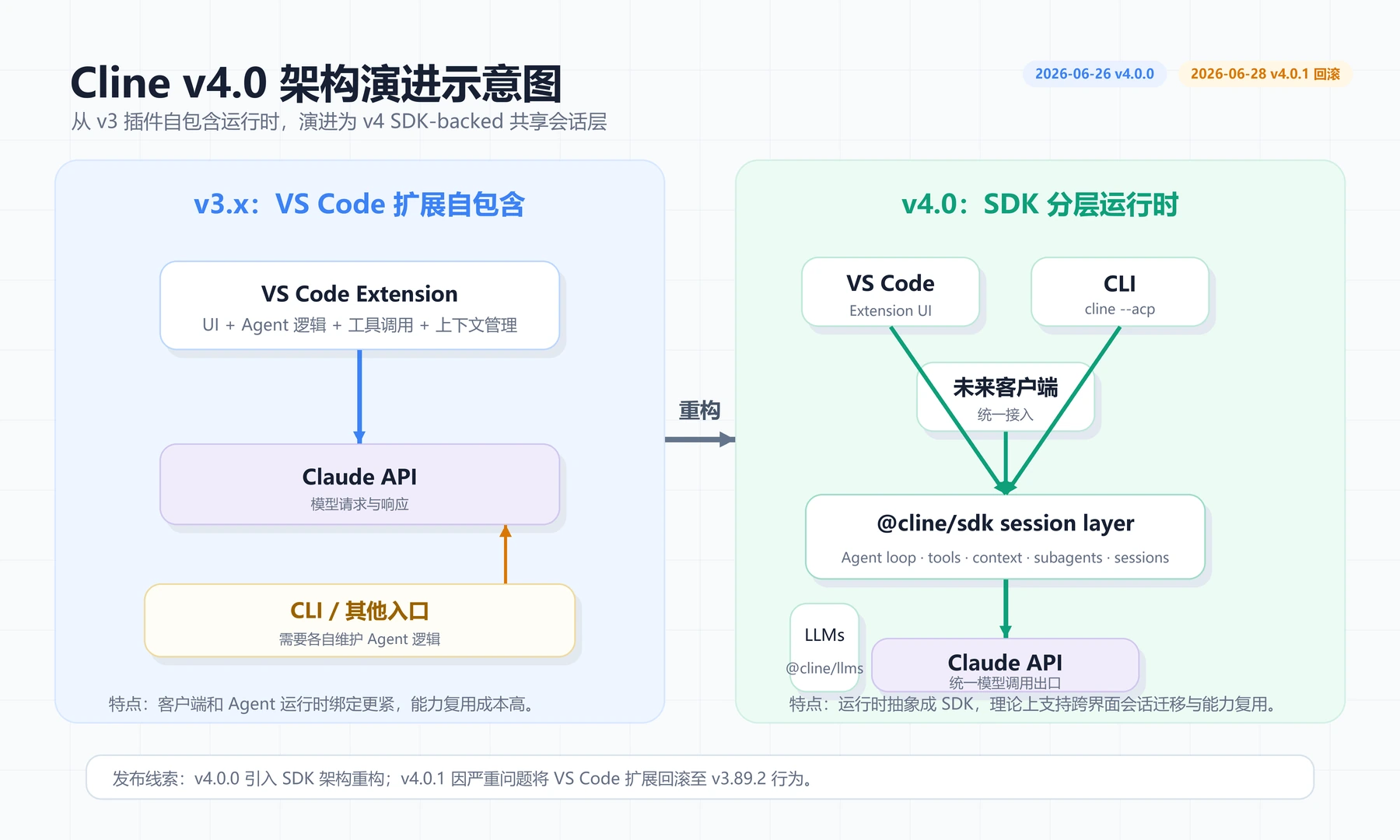
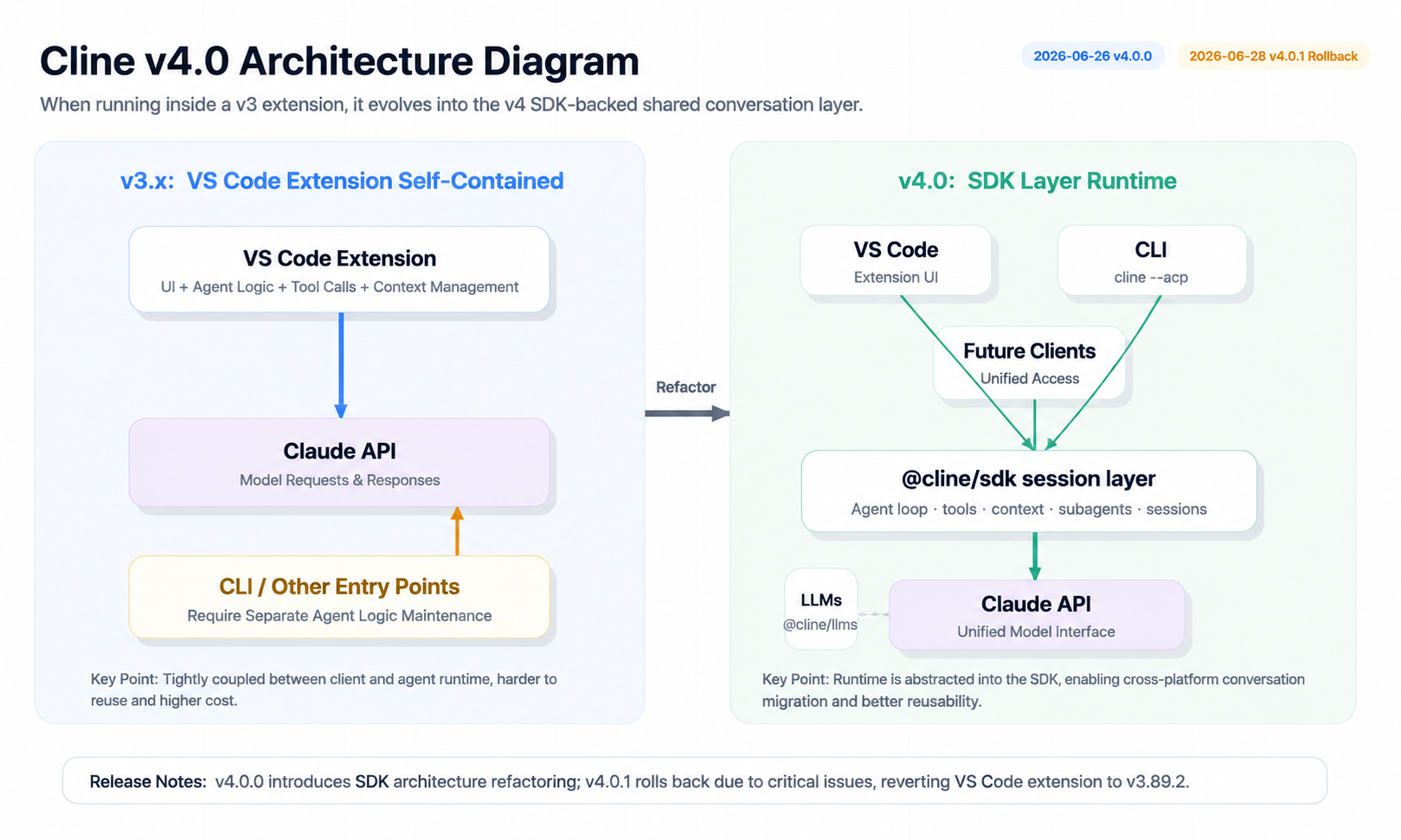
The core change was the SDK-backed VS Code extension runtime. Instead of the extension directly owning the agent loop, it routed task execution through the shared SDK session layer.
v3.x architecture:

VS Code extension -> extension-owned agent logic -> Claude API
CLI               -> CLI-owned agent logic       -> Claude API

v4.0 architecture:

VS Code extension ──┐
CLI / ACP clients ──┼─> @cline/sdk session layer -> Claude API
future clients   ───┘
v3.x architecture:

VS Code extension -> extension-owned agent logic -> Claude API
CLI               -> CLI-owned agent logic       -> Claude API

v4.0 architecture:

VS Code extension ──┐
CLI / ACP clients ──┼─> @cline/sdk session layer -> Claude API
future clients   ───┘
The package split is useful conceptually:
| Package | Role | When it matters |
|---|---|---|
@cline/sdk |
Full agent runtime, including loops, tools, context, and subagents | When a client needs full Cline agent behavior |
@cline/llms |
Lower-level provider and model handler layer | When a tool only needs model calls, not the full agent loop |
The v4.0.0 release also introduced or highlighted features such as:
- SDK-backed VS Code runtime
- Cline Plugins
- Customize marketplace for skills, MCP servers, plugins, and workflow extensions
- queued prompts while a task is running
- editing previous messages and regenerating
Those features are important for Cline’s long-term direction. But they did not remain active in the stable VS Code extension after the rollback.
v4.0.1 was a rollback, not a normal patch
This is the key detail.
Cline v4.0.1 was released on June 28, 2026. Its release notes say the stable VS Code extension was rolled back to the codebase before SDK migration, effectively the v3.89.2 code, while using a higher version number so v4.0.0 users would receive the update.
In practical terms:
- v4.0.1 is not “v4.0.0 with a few bug fixes.”
- v4.0.1 is the stable extension rolled back to pre-SDK-migration behavior.
- v4.0 features such as Plugins, Customize marketplace, and queued prompts should not be assumed to be active in v4.0.1.
- The SDK migration is likely to return later, after the regressions are addressed.
That was the right operational move: stop the bleeding first, then reintroduce the architecture change when it is safer.
Known regressions reported after v4.0.0
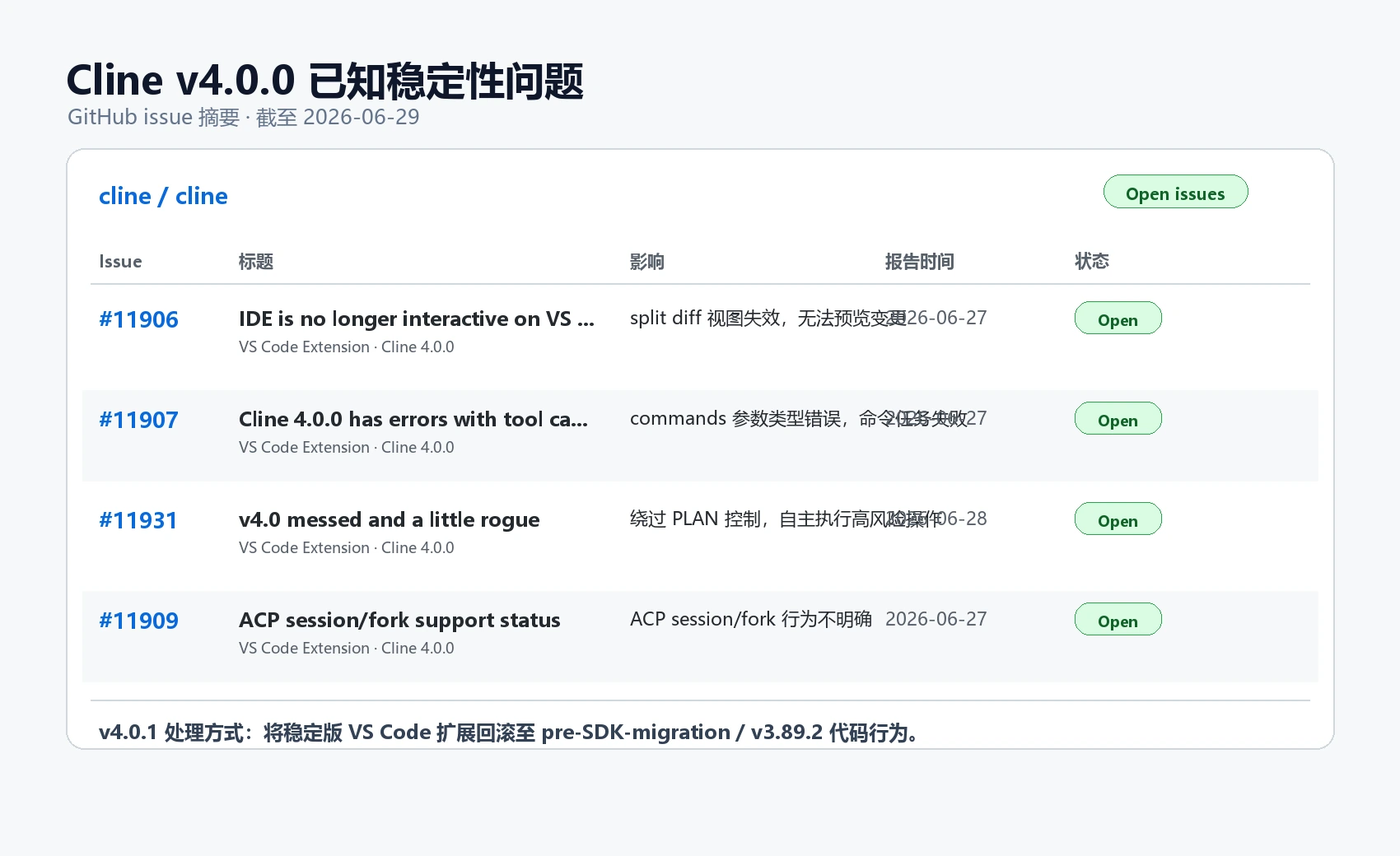
The reports below are based on public GitHub issues and should be read as user-reported regressions, not as a complete official postmortem.
Broken split diff view
Issue #11906 reported that after upgrading to v4.0.0, Cline’s split diff highlighting stopped working when editing files. Instead of showing a diff view for review, Cline could modify files directly.
That matters because the diff view is not cosmetic. It is part of the trust boundary for an AI coding assistant. Developers need to see what is about to change before accepting it.
run_commands type validation errors
Issue #11907 reported failures around the run_commands tool schema.
The reported error showed commands arriving as a string while the tool schema expected an array:
Invalid input for tool run_commands: Type validation failed:
Value: {"commands":"[...]"}.
Error message: expected array, received string
Invalid input for tool run_commands: Type validation failed:
Value: {"commands":"[...]"}.
Error message: expected array, received string
For users, this could break workflows that rely on shell execution: installing dependencies, running tests, building projects, or invoking scripts.
For ClaudeAPI users specifically, repeated failed tool calls can also increase token usage if the agent retries or loops around the failure.
Reports of agent behavior bypassing expected control
Issue #11931 described the most serious class of regression: the agent allegedly bypassed the user’s expected PLAN/ACT control flow, modified files, ran commands, and made changes that the reporter did not approve.
Any claim like this deserves careful wording. The important point is not to sensationalize it; the important point is operational. If a coding agent can execute commands or edit files outside the expected approval flow, teams should treat the version as unsafe for production work until the behavior is understood and fixed.
The v4.0.1 rollback substantially reduces the risk for users who updated away from v4.0.0.
ACP session and fork behavior uncertainty
Issue #11909 raised questions around ACP session and fork support. Because v4.0 was partly about a more unified session foundation, users building multi-agent workflows needed clearer documentation on session behavior, context transfer, and fork semantics.
If your team uses cline --acp or builds custom orchestration around Cline sessions, wait for clearer upstream guidance before expanding production workflows on top of the v4 SDK architecture.
Impact for ClaudeAPI users
The visible ClaudeAPI configuration path did not change in v4.0.0 or v4.0.1.
If your Cline setup uses OpenAI-compatible mode, the core fields remain:
API Provider: OpenAI Compatible
Base URL:     https://gw.claudeapi.com/v1
API Key:      your ClaudeAPI key
Model ID:     claude-haiku-4-5-20251001
API Provider: OpenAI Compatible
Base URL:     https://gw.claudeapi.com/v1
API Key:      your ClaudeAPI key
Model ID:     claude-haiku-4-5-20251001
You can also use claude-sonnet-4-6 for stronger coding tasks or claude-opus-4-8 for harder reasoning and refactoring.
The reported v4.0.0 problems were Cline-side runtime issues, not ClaudeAPI key or Base URL issues.
| Reported issue | Direct API impact |
|---|---|
| Broken diff view | Does not break API calls, but weakens review and approval safety |
run_commands schema failure |
Can trigger failed tool loops and unexpected token usage |
| Agent control-flow regression | High operational risk if commands or file edits run outside expected approval |
| ACP uncertainty | Relevant to teams using multi-agent or session orchestration |
Upgrade advice
| Scenario | Recommendation | Why |
|---|---|---|
| You are on v4.0.0 | Upgrade to v4.0.1 immediately | v4.0.1 rolls back the unstable stable-extension migration |
| You are on v3.89.2 and rely on Cline daily | Staying put is reasonable | v4.0.1 is effectively the same stable code path |
| You use Cline in production or important repos | Avoid v4.0.0; verify v4.0.1 carefully | File edits and command execution need strong trust boundaries |
| You are testing Cline features | Use a disposable workspace | v4 SDK work will likely return in a later release |
| You use ACP workflows | Wait for clearer session/fork guidance | Behavior was still unclear around the v4.0 rollout |
How to pin or roll back the VS Code extension
If you want to stay on a known stable build:
- Open VS Code.
- Open Extensions with
Ctrl+Shift+XorCmd+Shift+X. - Search for Cline.
- Open the extension menu.
- Choose “Install Another Version”.
- Select a known stable version such as v3.89.2, or use v4.0.1 if you want the rollback build.
- Restart VS Code.
- Disable extension auto-update if your workflow requires version pinning.
Version pinning is boring. Boring is good when the tool can edit files and run commands.
Five checks after upgrading to v4.0.1
After moving away from v4.0.0, do a small controlled test before returning to real work:
- Send a simple message such as
hiand confirm the model responds. - Open Cline settings and confirm Base URL, API key, and model ID are still correct.
- Ask Cline to edit a disposable test file and confirm the diff view appears.
- Run a harmless command task, such as listing files or running a small test script.
- Check token usage in the ClaudeAPI console to make sure there is no retry loop or abnormal spike.
Use a temporary repository for this verification, not a production codebase.
FAQ
Did v4.0.1 fix all v4.0.0 bugs?
Not exactly. v4.0.1 was a rollback of the stable VS Code extension to the pre-SDK-migration codebase. That removes the v4.0.0 regressions from the stable extension path, but it is not the same as fixing the SDK migration itself.
Did my ClaudeAPI configuration change?
No. The Cline API provider settings are still the same:
API Provider: OpenAI Compatible
Base URL:     https://gw.claudeapi.com/v1
Model ID:     claude-haiku-4-5-20251001
API Provider: OpenAI Compatible
Base URL:     https://gw.claudeapi.com/v1
Model ID:     claude-haiku-4-5-20251001
After any extension upgrade, still verify the settings and send a test message.
Are the reported issues caused by ClaudeAPI?
No. The reported regressions involved Cline’s extension/runtime behavior. Users of other providers could encounter the same class of issue. ClaudeAPI users mainly need to watch for extra token usage if a tool loop fails repeatedly.
Should I wait for v4.1?
If you depend on Cline for daily work, waiting is sensible. The SDK migration is valuable, but teams should let the next rollout prove itself in a test workspace before using it on important repositories.
What about the Cline CLI?
The CLI and VS Code extension have separate versioning and release channels. Do not assume a VS Code extension version and a CLI version represent the same runtime state. Check the relevant release notes before upgrading either one.
Quick ClaudeAPI setup for Cline
If you have not configured Cline with ClaudeAPI yet, use:
API Provider: OpenAI Compatible
Base URL:     https://gw.claudeapi.com/v1
API Key:      your ClaudeAPI key
Model ID:     claude-haiku-4-5-20251001
API Provider: OpenAI Compatible
Base URL:     https://gw.claudeapi.com/v1
API Key:      your ClaudeAPI key
Model ID:     claude-haiku-4-5-20251001
For more detail, see the Claude API Base URL configuration guide.
What to watch next
The SDK architecture still makes sense. It addresses real problems: duplicated agent logic, session persistence, cross-client reuse, plugins, and future multi-agent workflows.
The lesson from v4.0.0 is not “SDK migration is bad.” The lesson is that coding agents need extremely conservative rollout practices because they can edit files, run commands, and consume API tokens quickly.
For the next SDK-backed release, watch for:
- explicit release notes on restored diff behavior
- tool schema compatibility tests
- PLAN/ACT approval boundary fixes
- ACP session and fork documentation
- plugin and marketplace reintroduction
- reports from early adopters before upgrading production workflows