Suitable for: operation/content students who haven’t used API, don’t know code, but want to use Claude to do SEO. After finished, you can do: open Cherry Studio → select dialog box → paste keywords → get clustering results/content outline/refresh plan.
📖 read instructions
This article is Cherry Studio graphical interface operation tutorial, zero code to start, suitable for SEO operation, content editing and other non-technical students.
If you have a development background and want to directly access the automation workflow through the API, it is recommended to read the advanced version: Claude API for SEO Complete Guide (2026): 7 High-Value Scenarios + Prompt Templates →
What you need to prepare
| Item | Description | Where to get it | | ----- | ----- | ----- | Cherry Studio | | Cherry Studio | Free desktop client for Win/Mac | See step 1 below | | Claude API Key | Domestic direct connection, per-volume billing | claudeapi.com Get it after registering |
Cost reference: Charge 10 RMB = 10 USD API quota. A SEO keyword clustering task consumes about ¥0.05 to 0.10, 10 yuan can run hundreds of tasks.
Step 1: Download and Install Cherry Studio
Visit the official website to download: https://cherry-ai.com
- Windows: Download the
.exefile and double click to install. - Mac: Download the
.dmgfile and drag it into the Applications folder.
💡 Cherry Studio is freeware, you don’t need to register an account, just use it.
Step 2: Getting the Claude API Key
- Visit claudeapi.com and register an account
- Log in and go to the Token Management page.
- Click New Token, fill in any name (e.g. “SEO Workflow”) and click OK.
- Copy the generated Key (in the format of
sk-xxxxxxxxxxxxxxxxxxx).
⚠️ Key is only displayed once, copy it and save it to notepad.
Step 3: Configure the API in Cherry Studio
3.1 Adding a Model Provider
- Open Cherry Studio
- Find the Gear icon (Settings)
- Find Model Services (or “Providers”) in the left-hand menu.
- Click the Add button
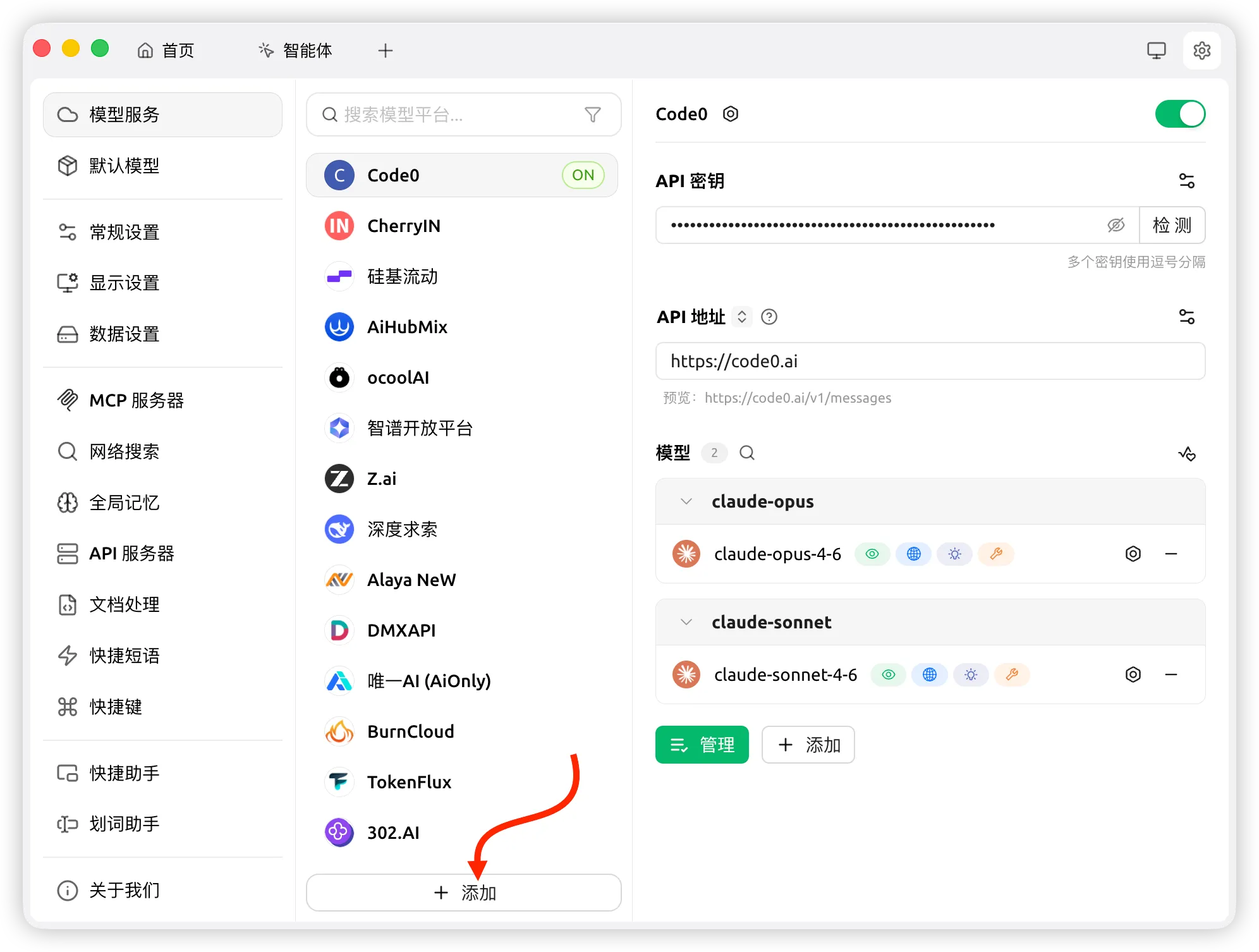 Fill in the following information:
| Fields | Fill in the content |
|—|—|Fill in the following information: | Field | Fill in the content | | -----| -----|
| Provider Name | claudeapi (customize, feel free) |
| Provider Category | select OpenAI or Anthropic) |
| API Key | Paste the Key you copied in step 2 | | API Address | OpenAI`** or Anthropic) | OpenAI Key
| API Address | https://code0.ai |
💡 **Why did you choose OpenAI format? ** claudeapi.com supports both Anthropic native format and OpenAI compliant format, choosing OpenAI format is easier to configure in Cherry Studio, and the function is the same.
Click OK to save.
3.2 Adding Models
Under the provider you just added, click Add Model and fill in:
| Fields | Fill in content |
|---|---|
| Model ID | claude-sonnet-4-6 |
| Model Name | Claude Sonnet 4.6 (for display, whatever) |
Add another spare:
| fields | fill in content |
|---|---|
| Model ID | claude-opus-4-6 |
| Model name | Claude Opus 4.6 |
Click Save.
3.3 Verifying the Configuration
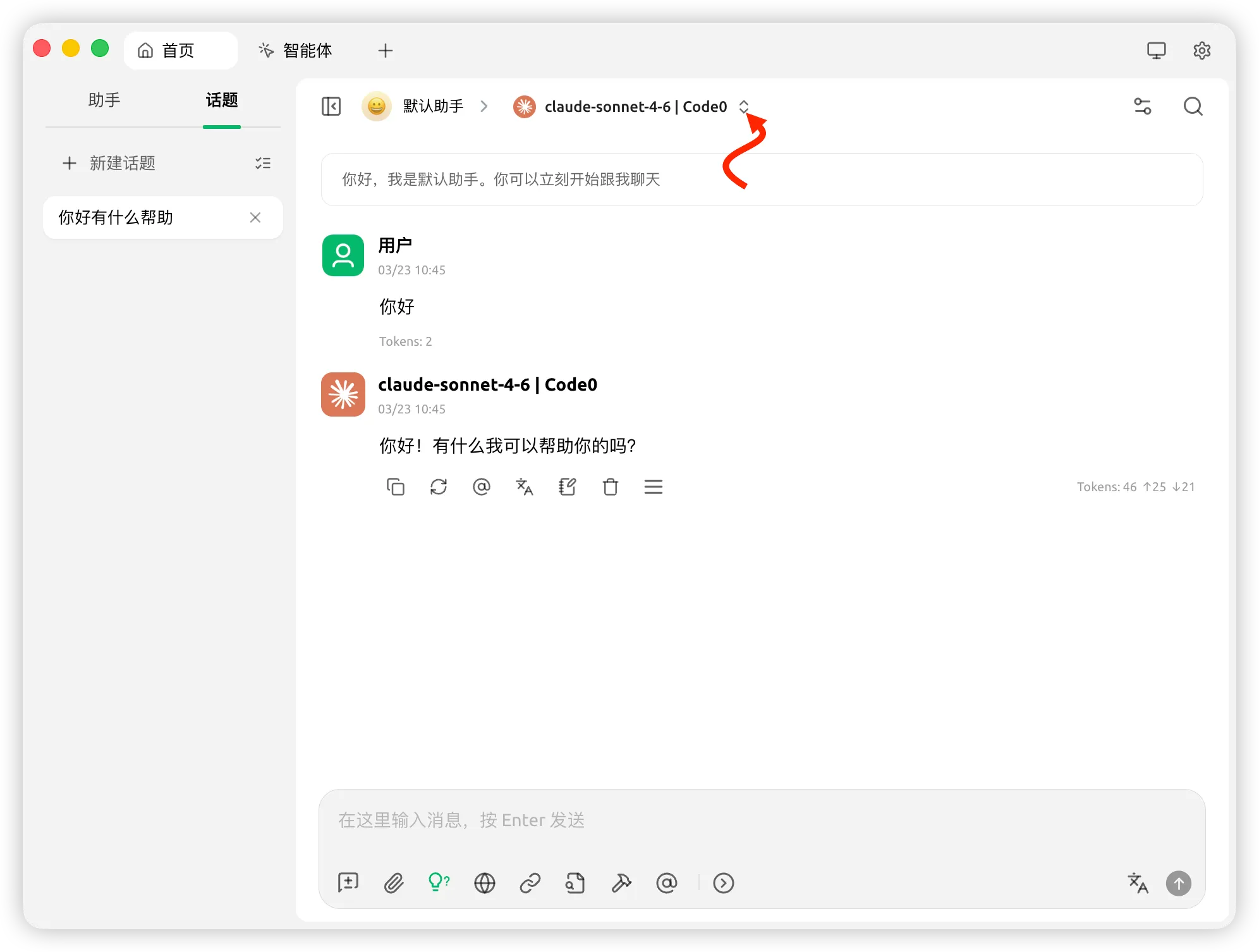
Go back to the main interface, click New Dialog, switch the model to Claude Sonnet 4.6 at the top of the dialog, send a random message (e.g. “Hello”), if you receive a normal reply, the configuration is successful.
Step 4: Create SEO-specific assistant (core step)
Cherry Studio’s helper feature can pre-store the system Prompt, so that every time you open the corresponding helper, it will automatically bring the SEO role settings, so you don’t need to rewrite the role description every time.
Click Assistants on the left side → Click New Assistant on the upper right corner, and create 6 SEO-specific assistants according to the following configuration:
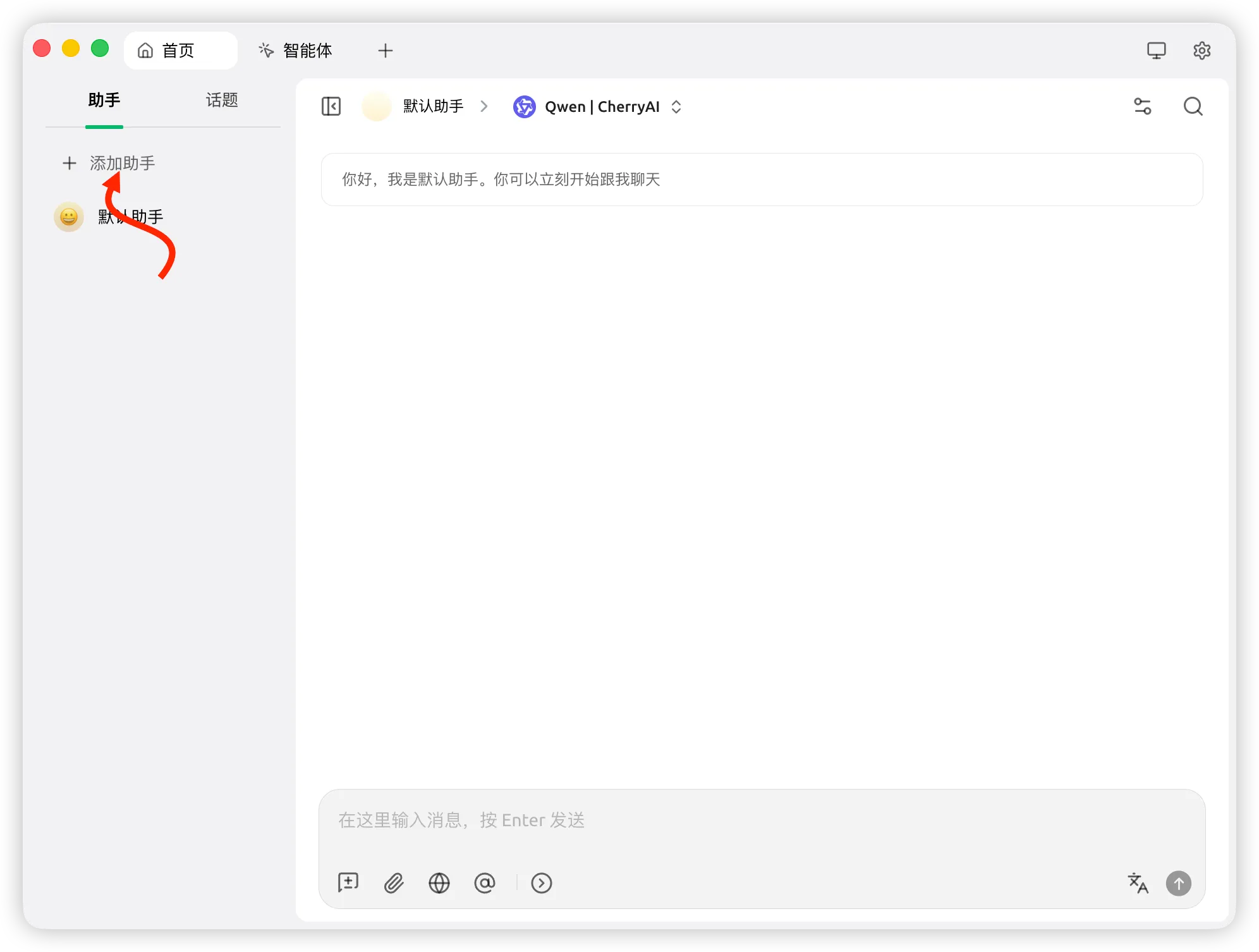
Assistant 1: Keyword Intent Clustering
Assistant Name: 🔍 Keyword Clustering
System hints (copy and paste into the “System Hints” box):
You are an experienced SEO content strategist specializing in keyword intent analysis and topic clustering.

When a user provides a list of keywords, you are tasked with:
1. categorize the keywords into up to 10 clusters
2. label each cluster with: primary intent (informational/business research/transactional/navigational), recommended SERP format (list article/landing page/comparison page/how-to/tools page)
3. Labeling the risk of potential keyword cannibalization
4. Sort by search value

Output format: Markdown table
Columns: Cluster Name | Primary Intent | SERP Format | Core Terms | Supporting Terms | Cannibalization Risk | Priority

Caution:
- Clusters should be mutually exclusive and avoid overlap
- If you have search volume data, please take it into account.
- Output in Chinese
``

<img src="/blog/cherry-studio-claude-api-seo-tutorial/cherry-studio-keyword-clustering-assistant-prompt-setup.webp" alt="Creating a keyword clustering assistant and configuring it in the System Prompt box to configure SEO Clustering Prompt" width="1992" height="1506" />

<img src="/blog/cherry-studio-claude-api-seo-tutorial/cherry-studio-keyword-clustering-chat-input-demo.webp" alt="Paste a list of keywords in the Cherry Studio Keyword Clustering Helper to paste a list of keywords to send an analysis request" width="1992" height="1506" />

<img src="/blog/cherry-studio-claude-api-seo-tutorial/cherry-studio-keyword-clustering-result-table.webp" alt="Keyword Clustering Helper outputs SEO keywords categorized by intent Markdown table results" width="1992" height="1506" />
**How to use:** Open this assistant → Paste the keyword list directly to send it

---

### Assistant 2: Content Outline Generation

**Assistant Name:** 📋 Outline Generation

**System prompt word: **
You are an experienced SEO content strategist specializing in keyword intent analysis and topic clustering.

When a user provides a list of keywords, you are tasked with:
1. categorize the keywords into up to 10 clusters
2. label each cluster with: primary intent (informational/business research/transactional/navigational), recommended SERP format (list article/landing page/comparison page/how-to/tools page)
3. Labeling the risk of potential keyword cannibalization
4. Sort by search value

Output format: Markdown table
Columns: Cluster Name | Primary Intent | SERP Format | Core Terms | Supporting Terms | Cannibalization Risk | Priority

Caution:
- Clusters should be mutually exclusive and avoid overlap
- If you have search volume data, please take it into account.
- Output in Chinese
``

<img src="/blog/cherry-studio-claude-api-seo-tutorial/cherry-studio-keyword-clustering-assistant-prompt-setup.webp" alt="Creating a keyword clustering assistant and configuring it in the System Prompt box to configure SEO Clustering Prompt" width="1992" height="1506" />

<img src="/blog/cherry-studio-claude-api-seo-tutorial/cherry-studio-keyword-clustering-chat-input-demo.webp" alt="Paste a list of keywords in the Cherry Studio Keyword Clustering Helper to paste a list of keywords to send an analysis request" width="1992" height="1506" />

<img src="/blog/cherry-studio-claude-api-seo-tutorial/cherry-studio-keyword-clustering-result-table.webp" alt="Keyword Clustering Helper outputs SEO keywords categorized by intent Markdown table results" width="1992" height="1506" />
**How to use:** Open this assistant → Paste the keyword list directly to send it

---

### Assistant 2: Content Outline Generation

**Assistant Name:** 📋 Outline Generation

**System prompt word: **
You’re an SEO content strategist who specializes in generating SERP-aligned content outlines.
You are tasked with generating a complete content outline when users provide target keywords and competing title structures.
Your output must contain:
- recommended H1 (3 alternatives, with keywords but natural)
- complete H2/H3 outline
- each H2 annotated with: a) what problem it solves for the reader, b) how it outperforms the competition (differentiated contribution)
- Suggested word count allocation
- suitable location for CTA
Constraints:
- Each H2 must correspond to a real reader’s problem, not a filler title such as “Summary” or “Conclusion”.
- If there is no competitor structure, infer the SERP structure based on the search intent of the target term.
- Output in Chinese
** Usage: **
** Usage: **
Target word: [your keyword]. Reader: [a one sentence description of the target user] Competitor H2 Structure: [paste the competitor title, you can leave it out if you don’t have one] ``
Assistant 3: Stock Page Refresh Diagnostics
Assistant Name: 🔄 Page Refresh
**System prompt word: **
You are an SEO Content Strategist focused on stock content optimization and ranking recovery.

You are tasked with generating an actionable content refresh plan when users provide on-page data.

Your output must contain:
1. 10 specific refreshing actions (no "improve readability" nonsense)
2. a description of each action in terms of impact (high/medium/low) and difficulty of implementation (high/medium/low)
3. a description of each article: what to change → why → how to validate in GSC
4. recommended anchor text direction for new internal links (don't make up URLs)
5. recommended new Title and Meta Description (3 options)

Note:
- All suggestions must be related to the data provided by the user, no generic suggestions can be given.
- If the user does not provide GSC data, ask first.
- Output in Chinese
You are an SEO Content Strategist focused on stock content optimization and ranking recovery.

You are tasked with generating an actionable content refresh plan when users provide on-page data.

Your output must contain:
1. 10 specific refreshing actions (no "improve readability" nonsense)
2. a description of each action in terms of impact (high/medium/low) and difficulty of implementation (high/medium/low)
3. a description of each article: what to change → why → how to validate in GSC
4. recommended anchor text direction for new internal links (don't make up URLs)
5. recommended new Title and Meta Description (3 options)

Note:
- All suggestions must be related to the data provided by the user, no generic suggestions can be given.
- If the user does not provide GSC data, ask first.
- Output in Chinese
**Usage: **
Page URL or Title: [fill in]
Primary target term: [fill in]
Lost ranked terms: [fill in]
Current average ranking: [fill in]
CTR: [fill in]
Starting time of traffic decline: [fill in]
Background: [e.g., competitor updates, algorithm fluctuations, etc.]
Current page H2 structure: [paste]
``

---

### Assistant 4: Internal Link Planning

**Assistant Name:** 🔗 Internal Link Planning

**System prompt word: **
Page URL or Title: [fill in]
Primary target term: [fill in]
Lost ranked terms: [fill in]
Current average ranking: [fill in]
CTR: [fill in]
Starting time of traffic decline: [fill in]
Background: [e.g., competitor updates, algorithm fluctuations, etc.]
Current page H2 structure: [paste]
``

---

### Assistant 4: Internal Link Planning

**Assistant Name:** 🔗 Internal Link Planning

**System prompt word: **
You are an SEO internal link strategist.
Your task is to create an internal link plan when users provide a list of target pages and site URLs.
Your output must contain:
- 10 recommended inbound links (other page → target page) with suggested anchor text variants and insertion locations
- 10 recommended outgoing links (target page → other pages) with anchor text and reason for linking
- anchor text diversification principle: exact match anchor text no more than 2 times, the rest use partial match or natural descriptive anchor text
Note:
- Only recommend the URL of the site provided by the user, do not make up links.
- Anchor text should be natural, as it appears in normal writing.
- Output in Chinese ``
** Usage:** ```
Destination page: [URL or page title]

List of site pages (one per line, format: URL | page type | core topic):
/blog/xxx | Tutorials | Claude API Usage
/pricing | Pricing Page | API Pricing
...
``

---

### Assistant 5: Content QA Review

**Assistant Name:** ✅ Content QA

**System prompt word:**
Destination page: [URL or page title]

List of site pages (one per line, format: URL | page type | core topic):
/blog/xxx | Tutorials | Claude API Usage
/pricing | Pricing Page | API Pricing
...
``

---

### Assistant 5: Content QA Review

**Assistant Name:** ✅ Content QA

**System prompt word:**
You are a professional SEO content editor responsible for quality review before publishing.
When a user provides a draft article, you need to complete a QA review according to the following criteria:
Audit Dimensions:
- Intent fulfillment (0 to 5 points, give reasons and specific suggestions for improvement)
- missing sections or unanswered reader questions (list specific questions)
- statements that require citation of sources (mark sentence by sentence, add a note [to be verified])
- contradictory or ambiguous statements (cite original text, give suggestions for changes)
- internal linking opportunities (suggest anchor text, format: [anchor text] → page type, do not make up URLs)
- H1/H2 order optimization suggestions
- CTA alignment to page target
And finally: overall rating (0 to 10) and top 3 things to change.
Note:
- Criticize the problem directly, don’t be polite
- Output in Chinese
**How to use:** Open this assistant → Paste draft article → Send

---

### Assistant 6: GEO Citation Optimization

**Assistant Name:** 🤖 GEO Optimization

**System cue word:**
**How to use:** Open this assistant → Paste draft article → Send

---

### Assistant 6: GEO Citation Optimization

**Assistant Name:** 🤖 GEO Optimization

**System cue word:**
You are a GEO (Generative Engine Optimization) expert focused on making content more citable by AI platforms.
When users provide article content, you need to analyze and provide optimization recommendations to make it more easily retrieved and cited by AI systems such as ChatGPT, Perplexity, Google AI Overviews, Claude, and others.
Analyze the dimensions:
- are there paragraphs (≤ 3 sentences, fact-intensive) that directly answer the target query?
- does the core conclusion appear before the first H2? (AI citations are biased towards introductory sections)
- are named entities (brands, tools, standards) clearly labeled?
- does it contain “independent quotable sentences” (concluding statements that can be understood without context)?
- is there an FAQ structure to add an FAQ Schema?
- which paragraphs are most likely to be picked up by the AI? Which are the least likely?
Output:
- List of issues (with severity for each item: high/medium/low)
- Specific rewriting suggestions for each item
- Suggested places to add “AI-friendly paragraphs” (give specific locations and examples)
Caution:
- Ask the user to specify the target query terms (what questions you want this content to be quoted by the AI in answering)
- Output in Chinese
---

## Step 5: Demonstration of actual use (full flow)

### Scenario: Building a content strategy for a new page from scratch

**Step 1: Keyword Clustering

Open the assistant "🔍 Keyword Clustering" and send:

``.
claude api, claude api price, claude api key, how to use claude api,
claude for seo, claude seo tool, claude content generation, anthropic api access,
claude vs chatgpt, claude api chinese, claude api tutorial, claude api no flip wall
``

Once you have the clustering results, select a target cluster (e.g., the "Getting Started with API Tutorials" category).

**Step 2: Generate a Content Outline

Open the assistant "📋 Outline Generation" and send it:
---

## Step 5: Demonstration of actual use (full flow)

### Scenario: Building a content strategy for a new page from scratch

**Step 1: Keyword Clustering

Open the assistant "🔍 Keyword Clustering" and send:

``.
claude api, claude api price, claude api key, how to use claude api,
claude for seo, claude seo tool, claude content generation, anthropic api access,
claude vs chatgpt, claude api chinese, claude api tutorial, claude api no flip wall
``

Once you have the clustering results, select a target cluster (e.g., the "Getting Started with API Tutorials" category).

**Step 2: Generate a Content Outline

Open the assistant "📋 Outline Generation" and send it:
Target term: claude api tutorial 2026 Readers: developers who have a certain technical foundation but have not used the Claude API Competing H2 structures: (go to Google and search for this term, copy and paste the top 3 H2s here)
**Step 3: QA** after writing the draft

Copy the full text of the draft, open the assistant "✅ Content QA" to paste and send it, and modify it according to the feedback.

**Step 4: Ranking is not satisfactory after 3 months on line, do a refresh**

Pull data from GSC, open the assistant "🔄 Page Refresh", fill in the data according to the template and send it.

---

## Frequently Asked Questions

**Q: What should I do if I get the message "Model does not exist" or "API Key is invalid"? **A: Check three things: ① Is the API address filled in `'?
A:Check three things: ① whether the API address is `https://code0.ai` (not `https://api.anthropic.com`); ② whether the Key is a complete copy (no extra space); ③ whether the account balance is sufficient.

**Q: Do you want to choose OpenAI or Anthropic for the provider category?** A: Choose **OpenAI or Anthropic?
A: Choose **OpenAI** (compatible format) and fill in `https://code0.ai` for the API address. If you want to use Anthropic native format, you can also choose Anthropic, and fill in the API address `https://code0.ai` as well, the effect is the same.

**Q: What models can I use? **
A: The usual ones:
- `claude-sonnet-4-6` (recommended, most cost-effective, suitable for 90% of SEO tasks)
- `claude-opus-4-6` (strongest, suitable for particularly complex analysis, 5 times more expensive)
- `claude-haiku-4-5` (fastest and cheapest, suitable for simple batch tasks)

**Q: Will Cherry Studio send my content to a third party? **
A: Cherry Studio is a local client, your content is sent directly to Anthropic via API (relayed by claudeapi.com), it will not go through Cherry Studio's servers. claudeapi.com doesn't keep a specific record of what was called.

**Q: Can I change the system prompt words by myself? **.
A: Absolutely. It is recommended to customize it according to your website's industry, target audience, and writing style. For example, add at the end of the system tips for each assistant:
**Step 3: QA** after writing the draft

Copy the full text of the draft, open the assistant "✅ Content QA" to paste and send it, and modify it according to the feedback.

**Step 4: Ranking is not satisfactory after 3 months on line, do a refresh**

Pull data from GSC, open the assistant "🔄 Page Refresh", fill in the data according to the template and send it.

---

## Frequently Asked Questions

**Q: What should I do if I get the message "Model does not exist" or "API Key is invalid"? **A: Check three things: ① Is the API address filled in `'?
A:Check three things: ① whether the API address is `https://code0.ai` (not `https://api.anthropic.com`); ② whether the Key is a complete copy (no extra space); ③ whether the account balance is sufficient.

**Q: Do you want to choose OpenAI or Anthropic for the provider category?** A: Choose **OpenAI or Anthropic?
A: Choose **OpenAI** (compatible format) and fill in `https://code0.ai` for the API address. If you want to use Anthropic native format, you can also choose Anthropic, and fill in the API address `https://code0.ai` as well, the effect is the same.

**Q: What models can I use? **
A: The usual ones:
- `claude-sonnet-4-6` (recommended, most cost-effective, suitable for 90% of SEO tasks)
- `claude-opus-4-6` (strongest, suitable for particularly complex analysis, 5 times more expensive)
- `claude-haiku-4-5` (fastest and cheapest, suitable for simple batch tasks)

**Q: Will Cherry Studio send my content to a third party? **
A: Cherry Studio is a local client, your content is sent directly to Anthropic via API (relayed by claudeapi.com), it will not go through Cherry Studio's servers. claudeapi.com doesn't keep a specific record of what was called.

**Q: Can I change the system prompt words by myself? **.
A: Absolutely. It is recommended to customize it according to your website's industry, target audience, and writing style. For example, add at the end of the system tips for each assistant:
Additional background: my website is [website name], for [target audience], and mainly sells/does [product/service].
**Q: Does dialog history affect the next mission? **
A: It will. If you finish a clustering task and want to start a completely unrelated outline task, it is recommended that **New Conversation** is created and not mixed in the same conversation to avoid contextual interference.

---

## Advanced: batch processing multiple pages (intermediate usage)

If you need to refresh 10 posts at the same time, you can do this:

1. Organize the data of 10 articles into a table (URL, main term, current rank, down time).
2. Open the "🔄 Page Refresh" assistant.
3. Send the format:
**Q: Does dialog history affect the next mission? **
A: It will. If you finish a clustering task and want to start a completely unrelated outline task, it is recommended that **New Conversation** is created and not mixed in the same conversation to avoid contextual interference.

---

## Advanced: batch processing multiple pages (intermediate usage)

If you need to refresh 10 posts at the same time, you can do this:

1. Organize the data of 10 articles into a table (URL, main term, current rank, down time).
2. Open the "🔄 Page Refresh" assistant.
3. Send the format:
I need to prioritize and make an initial plan for refreshing the following 10 pages:
Page 1: URL | Subject | Ranking | Background Page 2: URL | Subject | Ranking | Background …
Please sort by “Potential Recovery Value” and then give a detailed refresh plan for the top 3 pages.
This saves a lot of time compared to going through them one by one.

---

## Quick start list

- [ ] Download and install Cherry Studio (https://cherry-ai.com)
- [ ] Register at claudeapi.com and get API Key
- [ ] Top up your account (starting at $10, charged by volume)
- [ ] Add provider in Cherry Studio (OpenAI format at `https://code0.ai`)
- [ ] Add model `claude-sonnet-4-6`
- [ ] Create 6 SEO-specific helpers (copy the system prompt words above)
- [ ] Send the first test message to verify the configuration
- [ ] Start the first keyword clustering task

---

*Get API Key → [claudeapi.com](https://claudeapi.com)*
*Cherry Studio official website → [cherry-ai.com](https://cherry-ai.com)*
This saves a lot of time compared to going through them one by one.

---

## Quick start list

- [ ] Download and install Cherry Studio (https://cherry-ai.com)
- [ ] Register at claudeapi.com and get API Key
- [ ] Top up your account (starting at $10, charged by volume)
- [ ] Add provider in Cherry Studio (OpenAI format at `https://code0.ai`)
- [ ] Add model `claude-sonnet-4-6`
- [ ] Create 6 SEO-specific helpers (copy the system prompt words above)
- [ ] Send the first test message to verify the configuration
- [ ] Start the first keyword clustering task

---

*Get API Key → [claudeapi.com](https://claudeapi.com)*
*Cherry Studio official website → [cherry-ai.com](https://cherry-ai.com)*